

Page on the dashboard: dashboard.biolovers.site/dashboard/edit/connect/discord
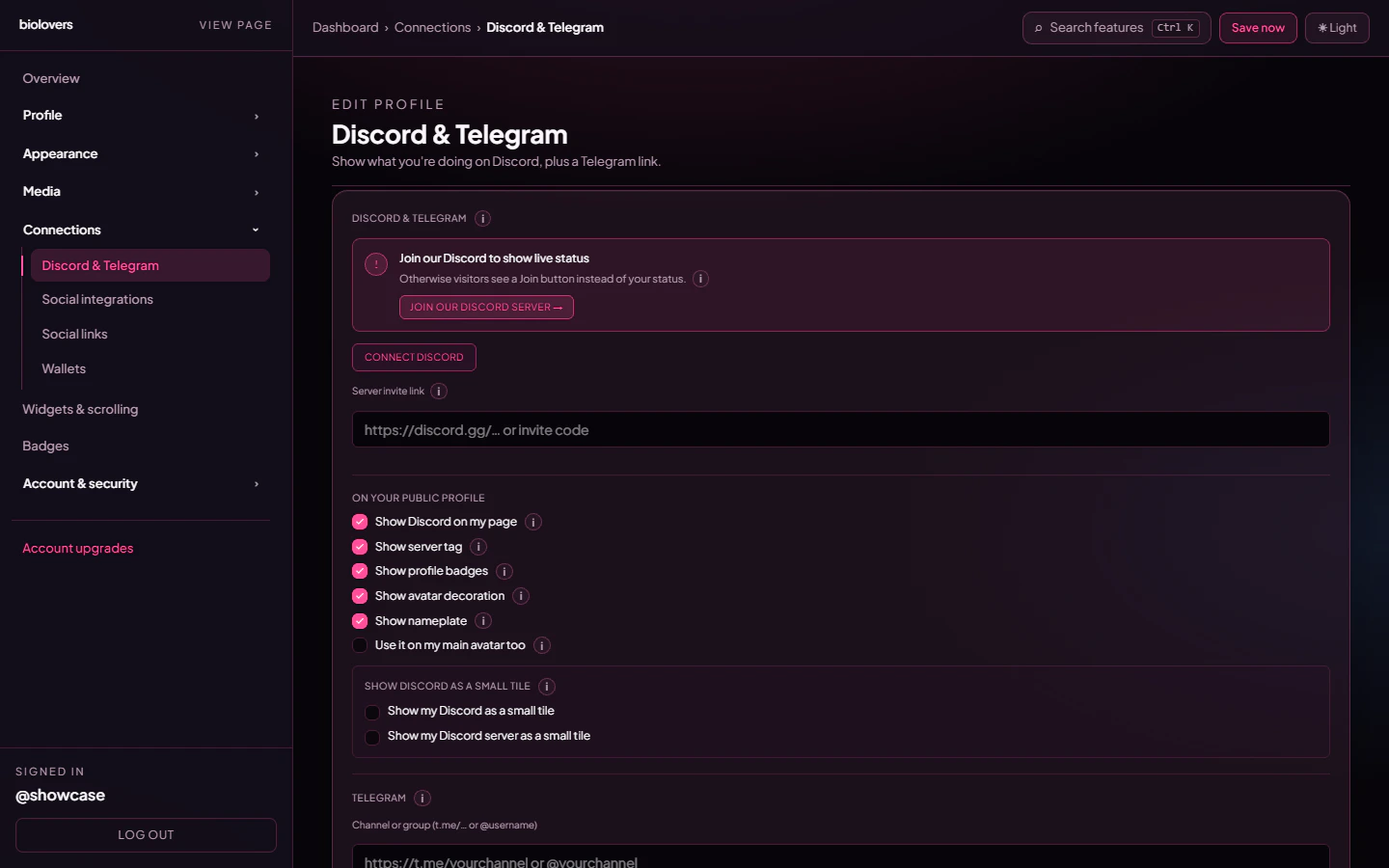
Discord & Telegram panel.
Link Discord
Tap Connect Discord. You’ll be sent to Discord’s OAuth screen — we ask for two scopes:identify and email. identify gives us your Discord ID, username, avatar, and global name; email is what lets the Continue with Discord button capture a verified email when you sign up. We never use it to merge two accounts — see Sign in with Discord or Google.
Once linked we use the Discord ID to:
- Drive the Discord presence card on your profile (what you’re playing / listening to / your status). The actual presence comes from the Biolovers Discord bot — it can only see your status when you share at least one server with the bot (the Biolovers Discord). The dashboard surfaces a “Join our Discord to show live status” banner explaining this.
- Grant / revoke the Premium, Verified, and Donator Discord roles after a purchase.
Public profile toggles
Once linked, the On your public profile group surfaces a stack of checkboxes (real labels):- Show Discord on my page — off keeps you linked for sign-in recovery / role grants but hides the Discord card from visitors.
- Show server tag — Discord’s server-rep tag next to your name.
- Show profile badges — Nitro, HypeSquad, staff, etc.
- Show avatar decoration — the Nitro-Shop frame around your avatar on the Discord card.
- Show nameplate — the Nitro-Shop gradient artwork behind the Discord card.
- Use it on my main avatar too — also wrap the avatar decoration around your main profile avatar.
Server invite
The Server invite link input takes ahttps://discord.gg/… URL or a bare invite code. Once a valid invite is set, we render the join card with the server icon, name, and online member count.
When you’ve linked Discord and set an invite, an extra dropdown appears:
- Server invite placement —
Inside the Discord cardorBelow the Discord card.
Show as small tile
The Show Discord as a small tile group has two checkboxes:- Show my Discord as a small tile — moves the Discord presence to the live-tile grid instead of the big panel.
- Show my Discord server as a small tile — same idea for the server invite card.
Sign in with Google
The same panel has a Sign in with Google row, right under your Discord connection. This is the dashboard side of the Continue with Google button — it changes how you can log in, not what shows on your public page.- Tap Connect Google to link your Google account. After that, you can use Continue with Google on the login page to sign in with one tap.
- Once linked, the row shows Connected with a Disconnect button to unlink it.
Telegram
Below Discord, the Telegram block has:- Channel or group (
t.me/…or@username) — the URL or handle. - Show Telegram widget on my public page — checkbox.
- Show channel photo next to the Telegram block — checkbox.
How presence is fetched
The Biolovers Discord bot connects to Discord’s gateway and listens for presence updates from members of every server it shares with you. There is no Lanyard relay — the bot itself emits the presence to your profile. If you don’t share a server with the bot, the card shows a Join our Discord call-to-action instead of your status.Common questions
My presence card says 'offline' but I'm online
My presence card says 'offline' but I'm online
See the dedicated page: Discord presence offline. Short answer: you need to share a server with the Biolovers Discord bot. Discord-status
Invisible also reads as offline by design.The server's online count is wrong
The server's online count is wrong
The number comes from the public guild widget which Discord refreshes lazily. Re-saving the invite forces a re-fetch.
My Discord nickname has weird characters
My Discord nickname has weird characters
We use whatever Discord returns, including emoji. To override the displayed name on your profile, use the Display name field — it doesn’t change anything in Discord itself.
I changed Discord servers, the old one still shows
I changed Discord servers, the old one still shows
Edit the Server invite link field on the panel. Saves automatically a few seconds after you stop typing.
What scope do you actually request?
What scope do you actually request?
identify and email. identify powers the presence card and role grants; email lets a Continue with Discord sign-in capture a verified email. We do not request guilds, guilds.members.read, guilds.join, or any bot scopes.