> ## Documentation Index
> Fetch the complete documentation index at: https://help.biolovers.site/llms.txt
> Use this file to discover all available pages before exploring further.
# Gaming settings widget
> Per-game mouse sens + aspect ratio. Drop in your config file (CS2, COD, BF2042, OW2, R6, Apex resolution, …) and the numbers auto-fill.
Add from: Widgets → Add widget → Gaming settings
A grid of small "what's your sens?" cards. Each card is one game with a fixed set of fields — **DPI, polling rate, in-game sens (and per-axis / per-scope variants where the game has them), and aspect ratio**. Drop in your config file and we read the numbers off it; or paste the values manually.
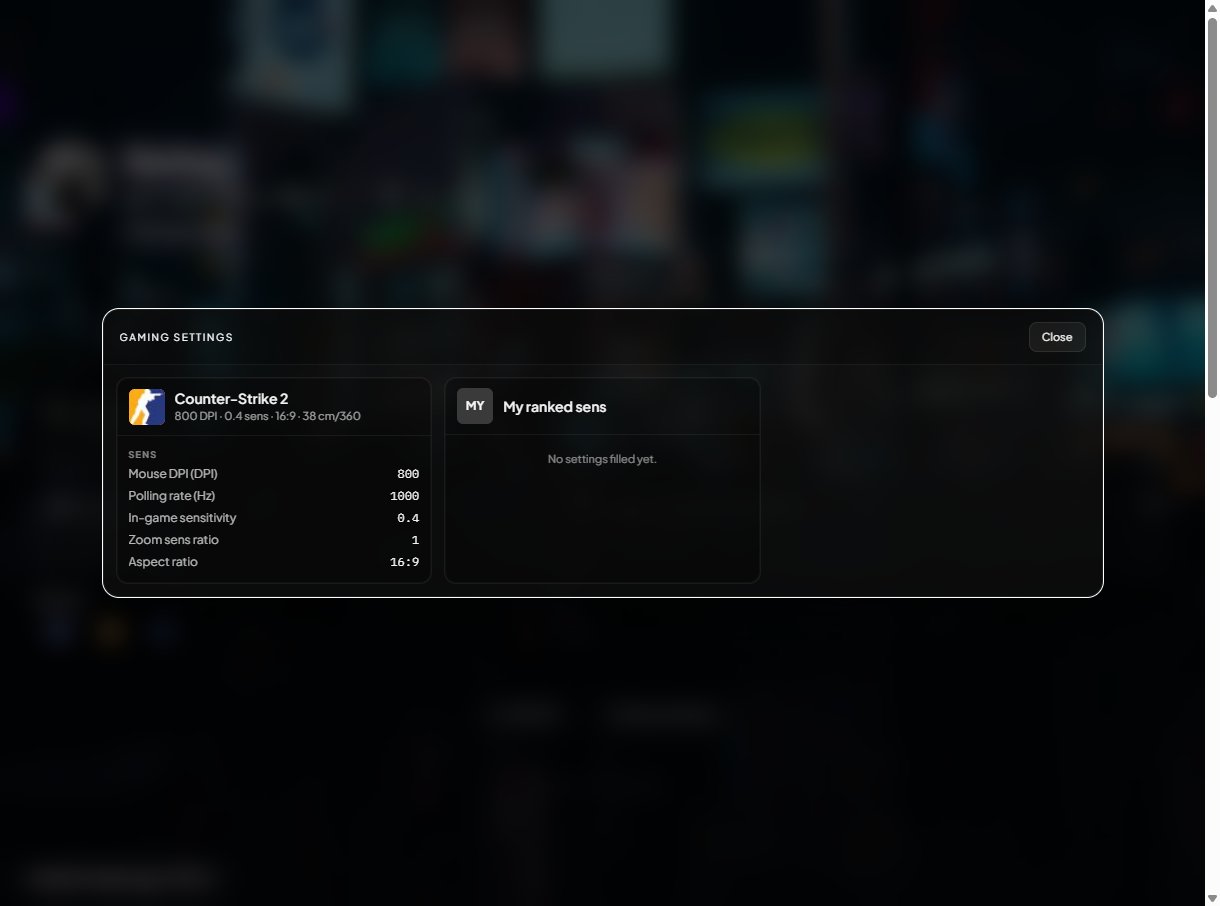 The widget is intentionally narrow — it's the smallest set of numbers another player needs to copy your feel. Resolution, refresh rate, FOV, mouse / keyboard / mouse pad / monitor / GPU / CPU, and keybinds are **not** part of this widget.
**Rainbow Six Siege** lives here for **mouse sens** (`GameSettings.ini`). Rank and level use the separate **Rainbow Six** live tile — see [Rainbow Six Siege on your profile](/widgets/rainbow-six-siege).
## Add a game from the catalog
1. Open Widgets.
2. Tap **+ Add widget → Gaming settings**.
3. Tap **+ Add game** at the bottom of the new widget.
4. Pick the title from the catalog grid.
The widget is intentionally narrow — it's the smallest set of numbers another player needs to copy your feel. Resolution, refresh rate, FOV, mouse / keyboard / mouse pad / monitor / GPU / CPU, and keybinds are **not** part of this widget.
**Rainbow Six Siege** lives here for **mouse sens** (`GameSettings.ini`). Rank and level use the separate **Rainbow Six** live tile — see [Rainbow Six Siege on your profile](/widgets/rainbow-six-siege).
## Add a game from the catalog
1. Open Widgets.
2. Tap **+ Add widget → Gaming settings**.
3. Tap **+ Add game** at the bottom of the new widget.
4. Pick the title from the catalog grid.
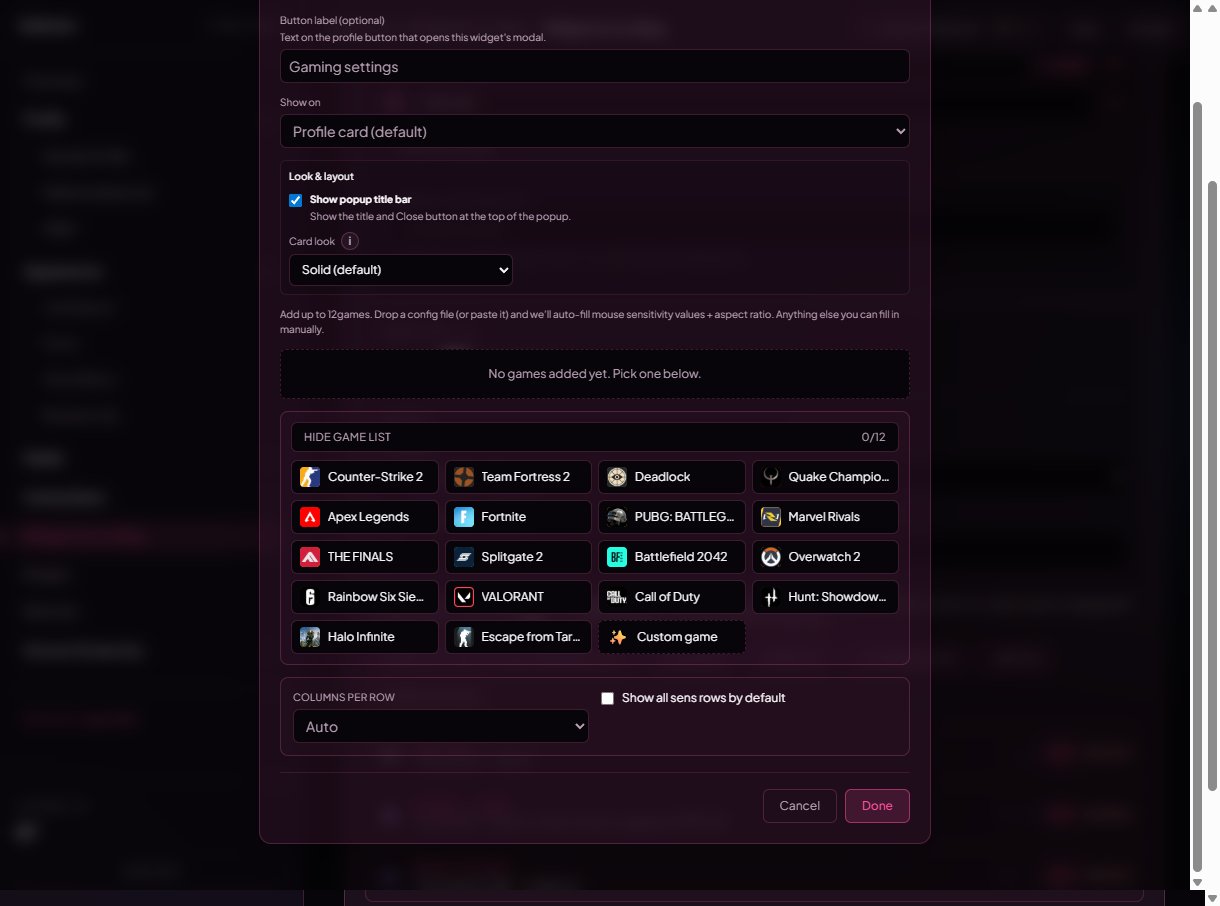 The catalog covers **18 titles**:
| Title | Auto-fill | Notes |
| ------------------- | --------- | --------------------------------------------------------------------------------------------------------- |
| Counter-Strike 2 | Full | Reads `cs2_user_convars_0_slot0.vcfg`. |
| Team Fortress 2 | Full | Reads `config.cfg`. |
| Deadlock | Partial | Reads `settings.cfg` (per-axis sens not exposed yet). |
| Quake Champions | Full | Reads per-user `client.cfg`. |
| Overwatch 2 | Full | Reads `Settings_v0.ini`. |
| Rainbow Six Siege | Full | Per-axis + per-scope ADS sens from `GameSettings.ini`. [Siege: rank vs sens](/widgets/rainbow-six-siege). |
| Battlefield 2042 | Full | Reads `PROFSAVE_profile`. |
| Call of Duty | Full | Reads `options.4.cod23.cst` (Warzone / MW shared). |
| Hunt: Showdown 1896 | Partial | Reads CryEngine `attributes.xml`-style cfg. |
| Halo Infinite | Full | Reads the user `LocalSettings.json`. |
| Escape from Tarkov | Partial | Reads the local profile cfg. |
| Apex Legends | None | Sens is account-side at Respawn — only resolution comes from the local file. |
| Fortnite | None | Sens is account-side at Epic. |
| PUBG: BATTLEGROUNDS | None | Sens is account-side at Krafton. |
| Marvel Rivals | None | Sens is account-side. |
| THE FINALS | None | Sens is account-side at Embark. |
| Splitgate 2 | None | Sens is account-side at 1047. |
| VALORANT | None | Sens is account-side at Riot. |
The **Auto sens** badge on each card tells you which level applies. *Partial* means we fill some of the fields and leave the rest for you to type.
## Auto-fill from your config file (free + Premium)
Each catalog game has a fixed spot on disk where its config file lives. Tap **"Where is my config file?"** on the entry to see the default OS paths.
The catalog covers **18 titles**:
| Title | Auto-fill | Notes |
| ------------------- | --------- | --------------------------------------------------------------------------------------------------------- |
| Counter-Strike 2 | Full | Reads `cs2_user_convars_0_slot0.vcfg`. |
| Team Fortress 2 | Full | Reads `config.cfg`. |
| Deadlock | Partial | Reads `settings.cfg` (per-axis sens not exposed yet). |
| Quake Champions | Full | Reads per-user `client.cfg`. |
| Overwatch 2 | Full | Reads `Settings_v0.ini`. |
| Rainbow Six Siege | Full | Per-axis + per-scope ADS sens from `GameSettings.ini`. [Siege: rank vs sens](/widgets/rainbow-six-siege). |
| Battlefield 2042 | Full | Reads `PROFSAVE_profile`. |
| Call of Duty | Full | Reads `options.4.cod23.cst` (Warzone / MW shared). |
| Hunt: Showdown 1896 | Partial | Reads CryEngine `attributes.xml`-style cfg. |
| Halo Infinite | Full | Reads the user `LocalSettings.json`. |
| Escape from Tarkov | Partial | Reads the local profile cfg. |
| Apex Legends | None | Sens is account-side at Respawn — only resolution comes from the local file. |
| Fortnite | None | Sens is account-side at Epic. |
| PUBG: BATTLEGROUNDS | None | Sens is account-side at Krafton. |
| Marvel Rivals | None | Sens is account-side. |
| THE FINALS | None | Sens is account-side at Embark. |
| Splitgate 2 | None | Sens is account-side at 1047. |
| VALORANT | None | Sens is account-side at Riot. |
The **Auto sens** badge on each card tells you which level applies. *Partial* means we fill some of the fields and leave the rest for you to type.
## Auto-fill from your config file (free + Premium)
Each catalog game has a fixed spot on disk where its config file lives. Tap **"Where is my config file?"** on the entry to see the default OS paths.
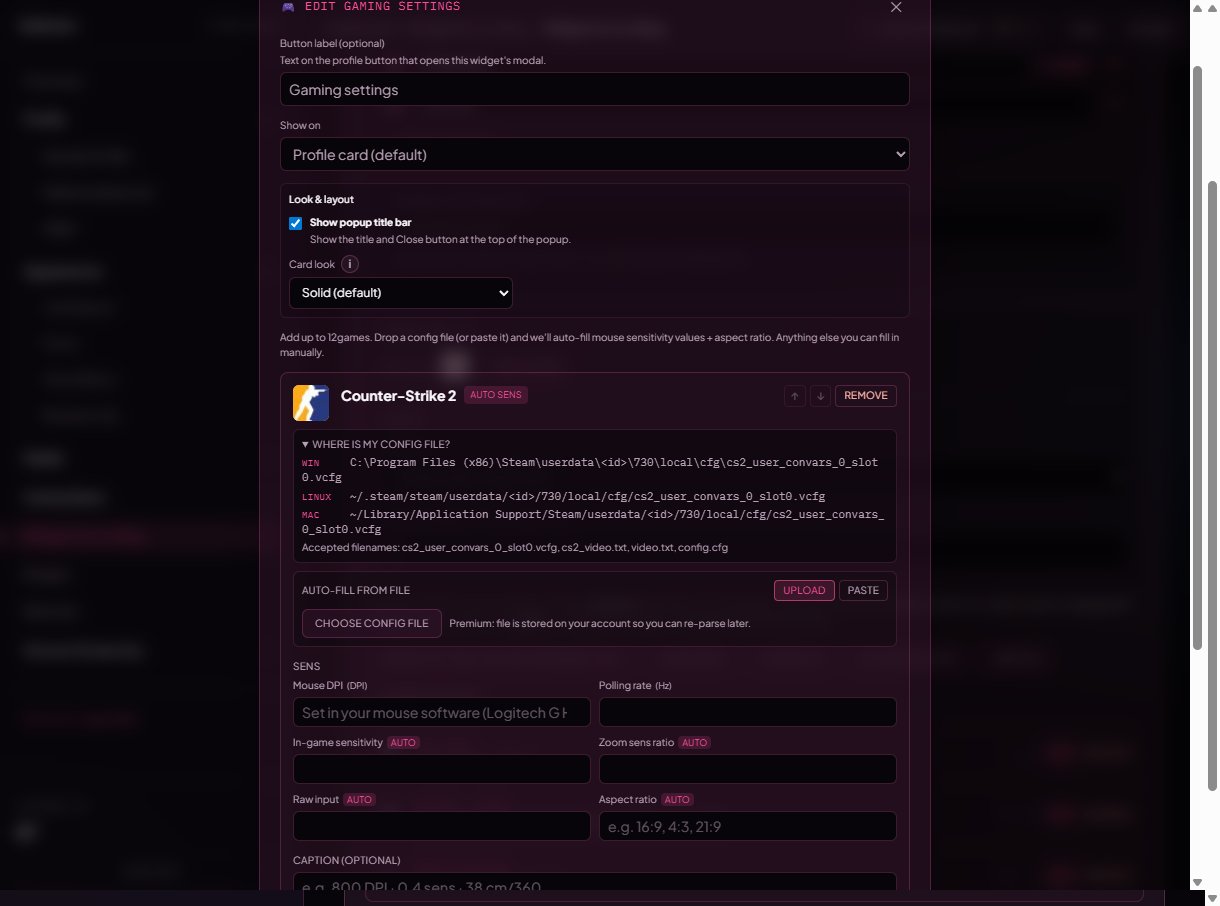 There are two ways to feed the file in:
### Upload tab
1. Tap **Upload** (selected by default).
2. Tap **Choose config file** and pick the file from disk.
3. We parse it, fill the sens table, and (if the parser found a useful note) drop it into the **Caption** field.
There are two ways to feed the file in:
### Upload tab
1. Tap **Upload** (selected by default).
2. Tap **Choose config file** and pick the file from disk.
3. We parse it, fill the sens table, and (if the parser found a useful note) drop it into the **Caption** field.
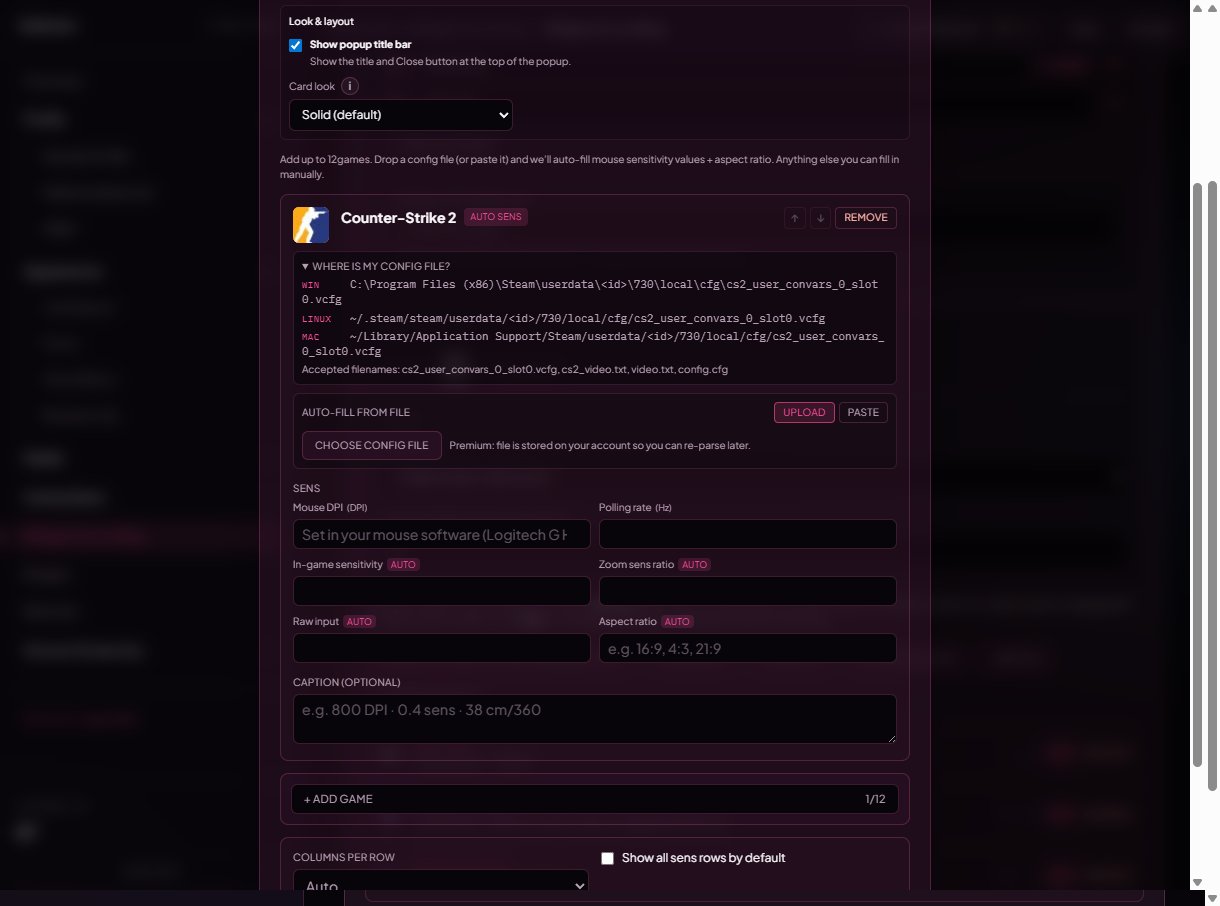 * **Free accounts:** the file is parsed in memory on the server and immediately discarded — only the extracted numbers are saved.
* **Premium accounts:** the file is stored on your account so you can re-parse it later (after a config change). A **Forget stored file** button appears next to the picker once you have one stored.
Allowed extensions: `cfg`, `vcfg`, `ini`, `txt`, `txt0`, `txt1`, `cst`, `json`, `xml`. Max **512 KiB** total (most games are under 64 KiB).
### Paste tab
If you can't upload from disk (school PC, work laptop, mobile), open the file in any text editor, copy the contents, then:
1. Tap **Paste**.
2. Paste into the box.
3. Click outside the box — we parse on blur.
* **Free accounts:** the file is parsed in memory on the server and immediately discarded — only the extracted numbers are saved.
* **Premium accounts:** the file is stored on your account so you can re-parse it later (after a config change). A **Forget stored file** button appears next to the picker once you have one stored.
Allowed extensions: `cfg`, `vcfg`, `ini`, `txt`, `txt0`, `txt1`, `cst`, `json`, `xml`. Max **512 KiB** total (most games are under 64 KiB).
### Paste tab
If you can't upload from disk (school PC, work laptop, mobile), open the file in any text editor, copy the contents, then:
1. Tap **Paste**.
2. Paste into the box.
3. Click outside the box — we parse on blur.
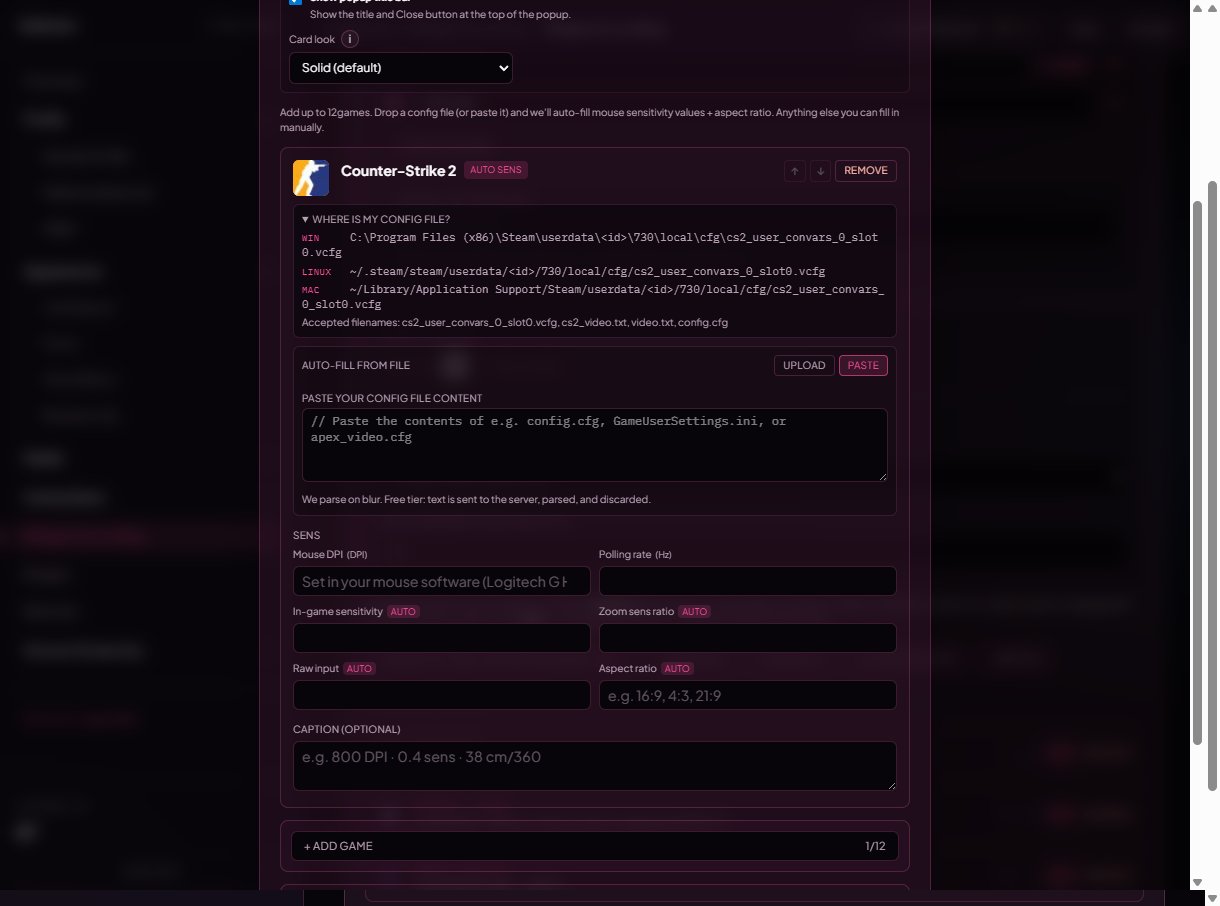 Pasted text is never persisted on your account — it's parsed once and dropped, on free *and* Premium.
### Cloud-sens games
Apex, Fortnite, PUBG, Marvel Rivals, The Finals, Splitgate 2, and VALORANT keep mouse sens on the **publisher's servers**, so the local config doesn't have your sens in it. The editor hides the upload tab for those games and shows a **"fill the fields below manually"** notice instead — copy the numbers from the in-game settings screen.
## Edit the numbers manually
Whether the parser ran or not, every entry has an editable sens table.
Pasted text is never persisted on your account — it's parsed once and dropped, on free *and* Premium.
### Cloud-sens games
Apex, Fortnite, PUBG, Marvel Rivals, The Finals, Splitgate 2, and VALORANT keep mouse sens on the **publisher's servers**, so the local config doesn't have your sens in it. The editor hides the upload tab for those games and shows a **"fill the fields below manually"** notice instead — copy the numbers from the in-game settings screen.
## Edit the numbers manually
Whether the parser ran or not, every entry has an editable sens table.
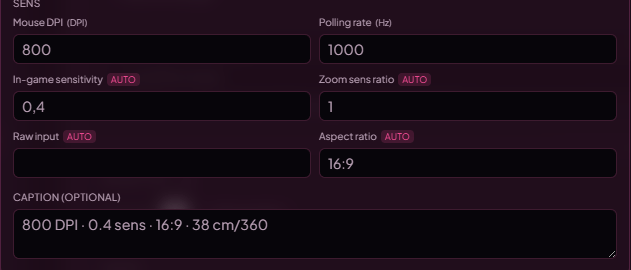 * Each catalog game has a **fixed list of fields** (DPI, polling rate, sens, ADS / scope variants, aspect ratio, etc.). You can leave any field blank — empty fields are dropped on save and never appear on the public widget.
* **Aspect ratio** is a free-form string (`"4:3"`, `"16:9"`, `"21:9"`, etc.). The parsers compute it from the resolution stored in the config when present.
* The auto-fill only ever **overwrites** fields the parser knows about — anything you typed manually that isn't part of the parsed set is left alone.
## Caption
Each entry has an optional **Caption** (max 400 chars). It shows under the game title on the public profile.
Examples:
* `800 DPI · 0.4 sens · 38 cm/360`
* `Same setup since Premier S2.`
* `4:3 stretched, classic feel.`
The auto-fill fills the caption with the parser's "found resolution: 1920×1080" style note **only when the caption is empty**, so manual captions are never overwritten.
## Custom games (Premium)
Need a game we don't catalog yet? Tap the **Custom game** tile in the picker (Premium-only) to add a fully blank entry.
* Each catalog game has a **fixed list of fields** (DPI, polling rate, sens, ADS / scope variants, aspect ratio, etc.). You can leave any field blank — empty fields are dropped on save and never appear on the public widget.
* **Aspect ratio** is a free-form string (`"4:3"`, `"16:9"`, `"21:9"`, etc.). The parsers compute it from the resolution stored in the config when present.
* The auto-fill only ever **overwrites** fields the parser knows about — anything you typed manually that isn't part of the parsed set is left alone.
## Caption
Each entry has an optional **Caption** (max 400 chars). It shows under the game title on the public profile.
Examples:
* `800 DPI · 0.4 sens · 38 cm/360`
* `Same setup since Premier S2.`
* `4:3 stretched, classic feel.`
The auto-fill fills the caption with the parser's "found resolution: 1920×1080" style note **only when the caption is empty**, so manual captions are never overwritten.
## Custom games (Premium)
Need a game we don't catalog yet? Tap the **Custom game** tile in the picker (Premium-only) to add a fully blank entry.
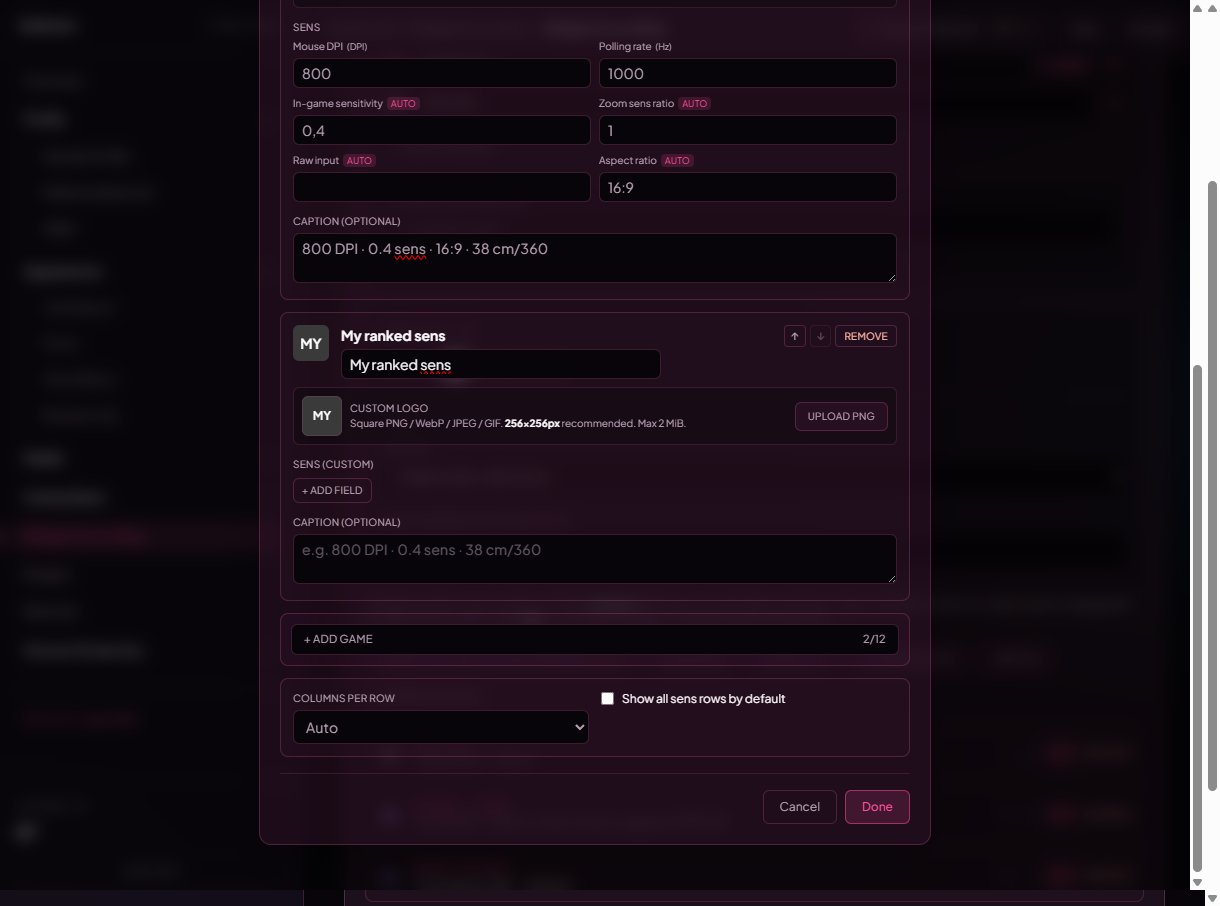 Custom entries:
* **Game name** — free text, used as the card title.
* **Custom logo** — upload your own square PNG / WebP / JPEG / GIF (max **2 MiB**, **256×256** recommended). Falls back to a 2-letter monogram of the game name when no logo is set. **Replace** swaps the logo, **Remove** clears it.
* **Sens fields** — fully freeform. Add any number of `key → value` rows; the field key is what visitors see as the row label.
Custom entries don't auto-fill from a config file (we don't have a parser for them) — you fill the fields by hand.
## Layout knobs
At the bottom of the widget editor:
Custom entries:
* **Game name** — free text, used as the card title.
* **Custom logo** — upload your own square PNG / WebP / JPEG / GIF (max **2 MiB**, **256×256** recommended). Falls back to a 2-letter monogram of the game name when no logo is set. **Replace** swaps the logo, **Remove** clears it.
* **Sens fields** — fully freeform. Add any number of `key → value` rows; the field key is what visitors see as the row label.
Custom entries don't auto-fill from a config file (we don't have a parser for them) — you fill the fields by hand.
## Layout knobs
At the bottom of the widget editor:
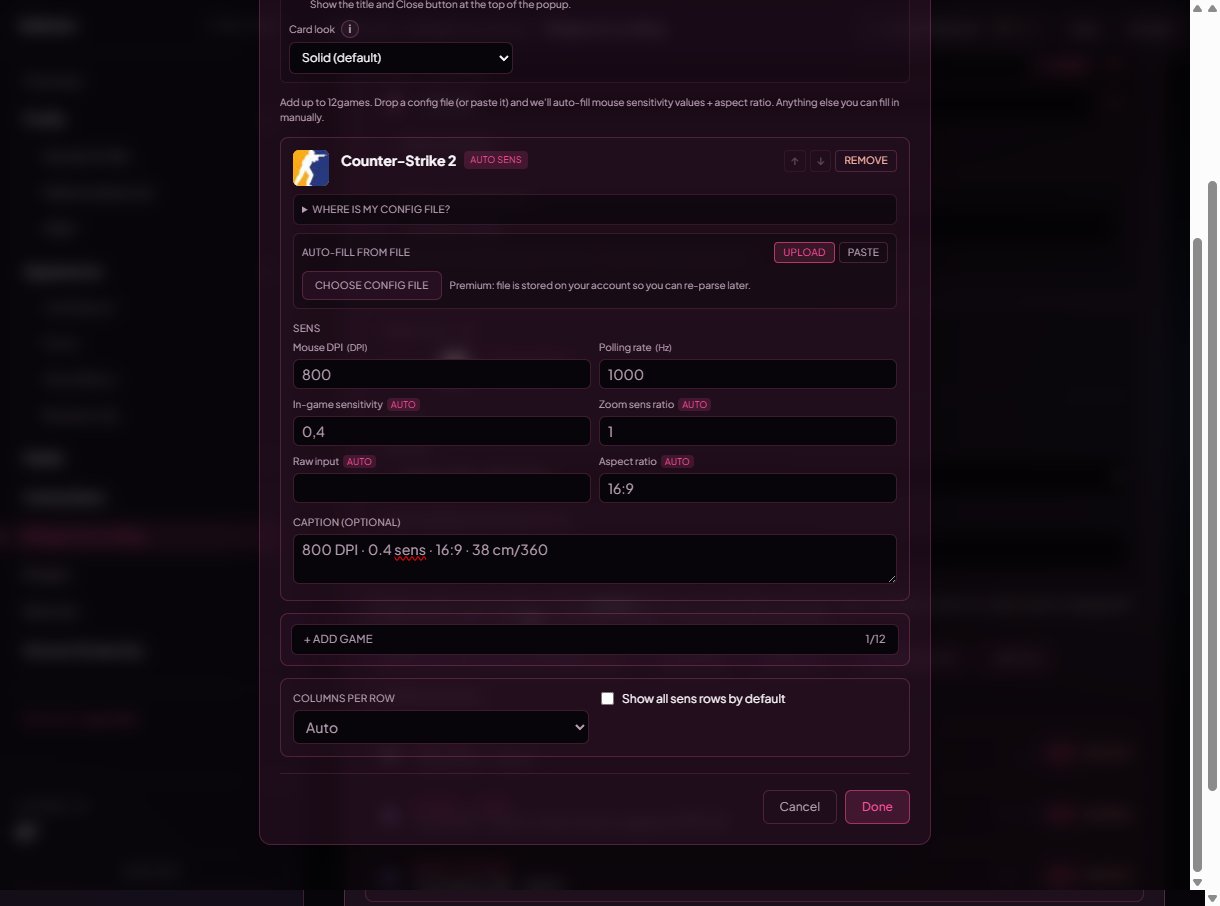 | Option | What it does |
| --------------------------------------------- | ------------------------------------------------------------------------------------------------------------------------------------------------------------------------------------------- |
| **Columns per row** | `Auto` (responsive auto-fit, default) or `1`–`4`. Auto fits as many \~280 px tiles as the container allows. |
| **Show all sens rows by default** *(Premium)* | When off, each card collapses to the first 4 sens rows with a **Show all (N more)** toggle. When on, every row is visible immediately — handy for R6 / COD where there are many ADS scopes. |
## Reorder + remove entries
Each card has **↑ / ↓** arrows to move it within the widget and a **Remove** button to delete just that game (the widget itself stays).
| Option | What it does |
| --------------------------------------------- | ------------------------------------------------------------------------------------------------------------------------------------------------------------------------------------------- |
| **Columns per row** | `Auto` (responsive auto-fit, default) or `1`–`4`. Auto fits as many \~280 px tiles as the container allows. |
| **Show all sens rows by default** *(Premium)* | When off, each card collapses to the first 4 sens rows with a **Show all (N more)** toggle. When on, every row is visible immediately — handy for R6 / COD where there are many ADS scopes. |
## Reorder + remove entries
Each card has **↑ / ↓** arrows to move it within the widget and a **Remove** button to delete just that game (the widget itself stays).
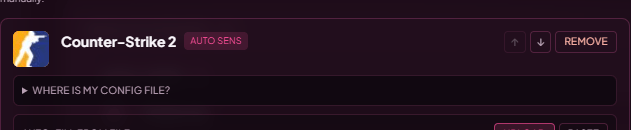 The widget itself can be moved between scroll pages or removed entirely from the **Widgets** page header.
## Limits
* **3 games per widget** on free accounts. **12 on Premium**.
* **16 widgets** total per profile (every widget type counts toward this).
* Config upload max **512 KiB**, with per-game caps that may be smaller (most are 256 KiB / 384 KiB).
* Custom logo upload max **2 MiB**, types: PNG, WebP, JPEG, GIF.
## Premium gating
| Feature | Free | Premium |
| ------------------------------------------------------ | --------------------------------------- | -------- |
| Catalog games | up to 3 | up to 12 |
| Custom (non-catalog) games | — | yes |
| Custom logo per entry | — | yes |
| Show all sens rows by default | — | yes |
| Store the config file on your account (re-parse later) | — | yes |
| Auto-fill from upload / paste | yes | yes |
| Auto-fill stays accurate after Premium expires | yes (the saved numbers don't disappear) | yes |
If you cancel Premium, your existing entries don't get deleted — but **custom-game entries**, **custom logos**, **the "show all by default" flag**, and **stored config files** are hidden until you renew.
## What visitors see
* Each card shows the game icon, game name, your caption (if set), and a **Sens** section with the filled rows.
* Rows are ordered the same on every profile (DPI → polling rate → sens → scopes → aspect ratio) so visitors always know where to look.
* On mobile the grid usually drops to one column; on desktop it follows your **Columns per row** setting.
## Common questions
Riot, Epic, Krafton, Embark, 1047 Games, and Respawn keep mouse sens on **their** servers — the file on your disk doesn't contain the number. Type your sens in manually from the in-game settings screen. The widget shows a "stores sens on the publisher's servers" hint on those entries so you don't waste time uploading.
CS2 stores user convars in `cs2_user_convars_0_slot0.vcfg` (it's the slot-0 file, even if you only have one slot — Steam still numbers it). Look under `Steam\userdata\\730\local\cfg\`. The classic `config.cfg` from CS:GO is not the right file.
The Battle.net Call of Duty title saves a `options.4.cod23.cst` (or similar `.cst` per major version) under `Documents\Call of Duty\players\`. Drop the whole file in — we read the binary KeyValues blob directly.
R6 writes per-axis sens (`MouseYawSensitivity`, `MousePitchSensitivity`) and per-scope ADS sens (1x, 1.5x, 2x, 2.5x, 3x, 4x, 5x, 12x). The widget surfaces those instead of the legacy combined `MouseSensitivity` because Ubisoft retired that key. The internal multiplier (`XFactorAiming`) is intentionally hidden — it's a step size, not your real sens.
Not yet. Catalog adds happen on Discord — drop a request in our Discord. As a workaround, **Custom game** (Premium) lets you add anything with your own fields and logo.
Free accounts never store the file — only the extracted numbers. To keep the file on your account for later re-parses, you need Premium. After a config change you can either upload again or paste the new contents.
The most likely cause is wrong file (e.g. `video.txt` instead of `videoconfig.txt` for Apex). Open the **"Where is my config file?"** drawer to see the accepted filenames. If you're sure it's the right file, paste the contents and re-try — and ping us in Discord with the game so we can fix the parser.
Yes. Add a second **Gaming settings** widget; each one keeps its own list of games. You're capped at 16 widgets total.
On free, the file's bytes are uploaded over HTTPS, parsed once on our server (in memory), and discarded. Only the extracted numbers are stored. On Premium the file is stored on your account so you can re-parse it later — you can wipe it any time with the **Forget stored file** button.
The widget itself can be moved between scroll pages or removed entirely from the **Widgets** page header.
## Limits
* **3 games per widget** on free accounts. **12 on Premium**.
* **16 widgets** total per profile (every widget type counts toward this).
* Config upload max **512 KiB**, with per-game caps that may be smaller (most are 256 KiB / 384 KiB).
* Custom logo upload max **2 MiB**, types: PNG, WebP, JPEG, GIF.
## Premium gating
| Feature | Free | Premium |
| ------------------------------------------------------ | --------------------------------------- | -------- |
| Catalog games | up to 3 | up to 12 |
| Custom (non-catalog) games | — | yes |
| Custom logo per entry | — | yes |
| Show all sens rows by default | — | yes |
| Store the config file on your account (re-parse later) | — | yes |
| Auto-fill from upload / paste | yes | yes |
| Auto-fill stays accurate after Premium expires | yes (the saved numbers don't disappear) | yes |
If you cancel Premium, your existing entries don't get deleted — but **custom-game entries**, **custom logos**, **the "show all by default" flag**, and **stored config files** are hidden until you renew.
## What visitors see
* Each card shows the game icon, game name, your caption (if set), and a **Sens** section with the filled rows.
* Rows are ordered the same on every profile (DPI → polling rate → sens → scopes → aspect ratio) so visitors always know where to look.
* On mobile the grid usually drops to one column; on desktop it follows your **Columns per row** setting.
## Common questions
Riot, Epic, Krafton, Embark, 1047 Games, and Respawn keep mouse sens on **their** servers — the file on your disk doesn't contain the number. Type your sens in manually from the in-game settings screen. The widget shows a "stores sens on the publisher's servers" hint on those entries so you don't waste time uploading.
CS2 stores user convars in `cs2_user_convars_0_slot0.vcfg` (it's the slot-0 file, even if you only have one slot — Steam still numbers it). Look under `Steam\userdata\\730\local\cfg\`. The classic `config.cfg` from CS:GO is not the right file.
The Battle.net Call of Duty title saves a `options.4.cod23.cst` (or similar `.cst` per major version) under `Documents\Call of Duty\players\`. Drop the whole file in — we read the binary KeyValues blob directly.
R6 writes per-axis sens (`MouseYawSensitivity`, `MousePitchSensitivity`) and per-scope ADS sens (1x, 1.5x, 2x, 2.5x, 3x, 4x, 5x, 12x). The widget surfaces those instead of the legacy combined `MouseSensitivity` because Ubisoft retired that key. The internal multiplier (`XFactorAiming`) is intentionally hidden — it's a step size, not your real sens.
Not yet. Catalog adds happen on Discord — drop a request in our Discord. As a workaround, **Custom game** (Premium) lets you add anything with your own fields and logo.
Free accounts never store the file — only the extracted numbers. To keep the file on your account for later re-parses, you need Premium. After a config change you can either upload again or paste the new contents.
The most likely cause is wrong file (e.g. `video.txt` instead of `videoconfig.txt` for Apex). Open the **"Where is my config file?"** drawer to see the accepted filenames. If you're sure it's the right file, paste the contents and re-try — and ping us in Discord with the game so we can fix the parser.
Yes. Add a second **Gaming settings** widget; each one keeps its own list of games. You're capped at 16 widgets total.
On free, the file's bytes are uploaded over HTTPS, parsed once on our server (in memory), and discarded. Only the extracted numbers are stored. On Premium the file is stored on your account so you can re-parse it later — you can wipe it any time with the **Forget stored file** button.