> ## Documentation Index
> Fetch the complete documentation index at: https://help.biolovers.site/llms.txt
> Use this file to discover all available pages before exploring further.
# Name & about me
> Display name, optional typewriter rotation, and your short bio with a small markdown subset.
Page on the dashboard: dashboard.biolovers.site/dashboard/edit/profile/about
This is the text part of your profile — the big name at the top, the @handle right next to it, and the short bio below.
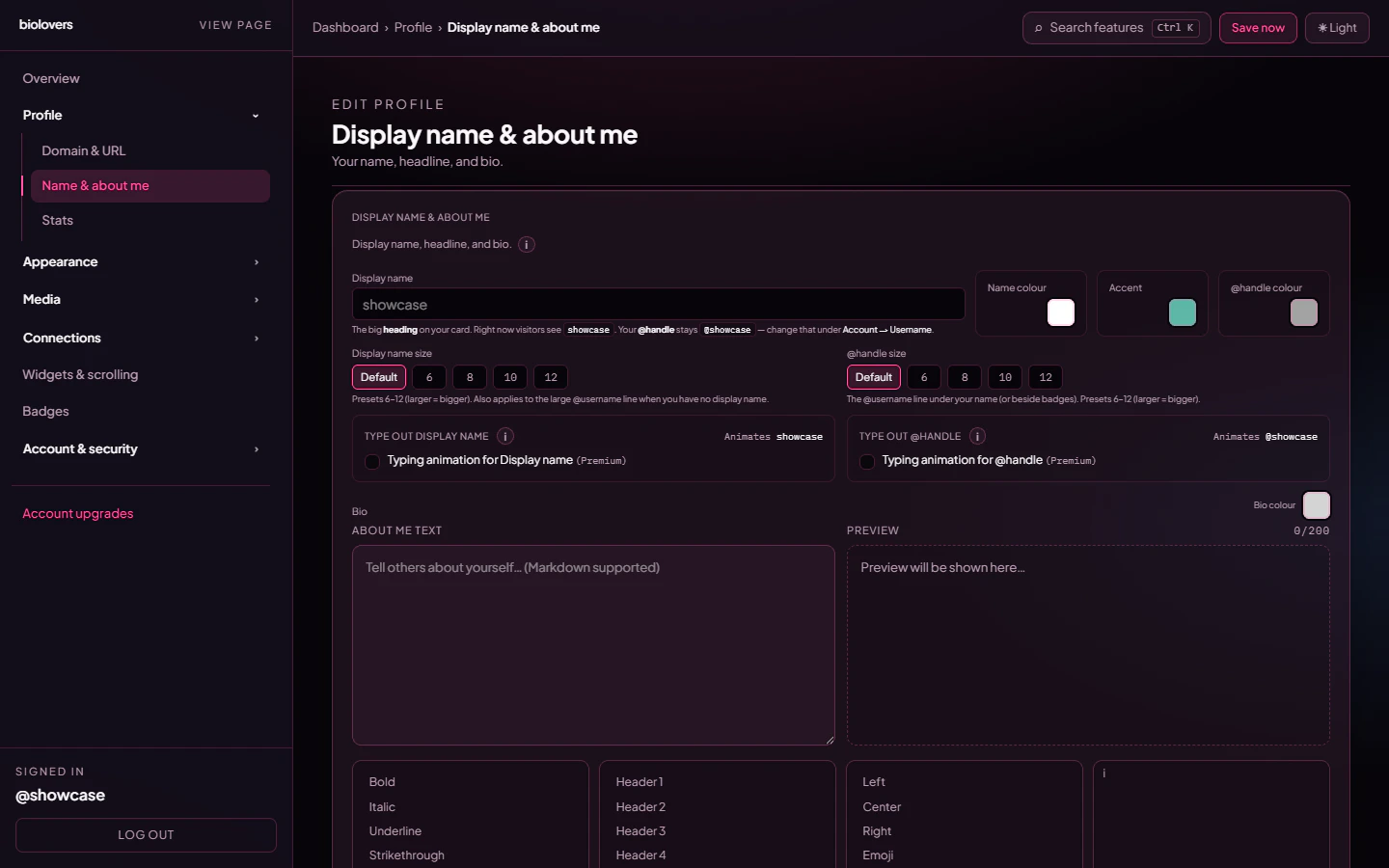 ## Display name
The big name at the top of your profile.
* Up to 64 characters.
* Emojis and Unicode work.
* Different from your **username** (login name). You can be `awesome_user_42` in URLs and "✦ Atlas ✦" on the page.
Leave it empty to fall back to `@username`.
### Display name size
Pick from a small set of size presets in the same panel — they affect just the display name, not the rest of the card.
### Accent color
The **accent color** picker lives on this panel too. It drives buttons, link hovers, and the highlight color used elsewhere on the card.
## Typewriter (animated rotation)
A typewriter effect can rotate through multiple phrases on the **display name**, **@handle**, or **bio** — one per line in the phrases input. Useful for showing several taglines without taking up extra space.
| Option | What it does |
| -------------------------- | ------------------------------------------------------------------------ |
| **Phrases (one per line)** | The list to rotate through. Each line is one phrase. |
| **Speed** | How fast each character types. |
| **Loop** | When off, types the last phrase once and stops. When on, cycles forever. |
The typewriter feature is **Premium**. Free accounts see the toggle but it stays disabled. The same controls also gate the (Premium-only) **browser tab title typewriter** — see [Browser tab](/appearance/browser-tab).
## About me / bio
A short paragraph below your handle. The dashboard editor caps it at **200 characters**, so think of it as a one-liner, not an essay.
It supports a small **markdown** subset rendered through a custom safe renderer:
| Syntax | Result |
| -------------------------------------------- | ------------------- |
| `**bold**` | **bold** |
| `*italic*` | *italic* |
| `__underline__` | underlined |
| `~~strike~~` | ~~strike~~ |
| `# Heading` (h1–h4) | A heading |
| `[label](https://link)` | a link |
| `centered` | center-aligned text |
| `right` / `left` | alignment wrappers |
Line breaks in the editor are real line breaks — no need for `
## Display name
The big name at the top of your profile.
* Up to 64 characters.
* Emojis and Unicode work.
* Different from your **username** (login name). You can be `awesome_user_42` in URLs and "✦ Atlas ✦" on the page.
Leave it empty to fall back to `@username`.
### Display name size
Pick from a small set of size presets in the same panel — they affect just the display name, not the rest of the card.
### Accent color
The **accent color** picker lives on this panel too. It drives buttons, link hovers, and the highlight color used elsewhere on the card.
## Typewriter (animated rotation)
A typewriter effect can rotate through multiple phrases on the **display name**, **@handle**, or **bio** — one per line in the phrases input. Useful for showing several taglines without taking up extra space.
| Option | What it does |
| -------------------------- | ------------------------------------------------------------------------ |
| **Phrases (one per line)** | The list to rotate through. Each line is one phrase. |
| **Speed** | How fast each character types. |
| **Loop** | When off, types the last phrase once and stops. When on, cycles forever. |
The typewriter feature is **Premium**. Free accounts see the toggle but it stays disabled. The same controls also gate the (Premium-only) **browser tab title typewriter** — see [Browser tab](/appearance/browser-tab).
## About me / bio
A short paragraph below your handle. The dashboard editor caps it at **200 characters**, so think of it as a one-liner, not an essay.
It supports a small **markdown** subset rendered through a custom safe renderer:
| Syntax | Result |
| -------------------------------------------- | ------------------- |
| `**bold**` | **bold** |
| `*italic*` | *italic* |
| `__underline__` | underlined |
| `~~strike~~` | ~~strike~~ |
| `# Heading` (h1–h4) | A heading |
| `[label](https://link)` | a link |
| `centered` | center-aligned text |
| `right` / `left` | alignment wrappers |
Line breaks in the editor are real line breaks — no need for `
`.
What is **not** supported: bullet lists (`-`), numbered lists, code fences, blockquotes (`>`), horizontal rules (`---`), and inline images (`![]()`). The renderer also strips raw HTML and scripts. If you need richer content (images, lists, embeds), use a [Markdown infobox widget](/widgets/markdown-infobox) below the card instead — it has the same renderer but a much higher character cap.
## Common questions
Anywhere. Display name, bio. Tap your system emoji picker (Win + `.` on Windows, Ctrl + Cmd + Space on Mac).
Yes — apply a [Text effect](/appearance/text-effects) (gradient or glow) to the display name. Premium feature.
There's no dedicated tagline field. Use the typewriter (Premium) on the display name with multiple phrases, or put a one-line tagline at the start of your bio.
That's the editor's hard cap. For longer text, add a [Markdown infobox widget](/widgets/markdown-infobox) below your card — it accepts up to 12,000 characters.
Make sure you used the markdown syntax: `[label](https://full-url-with-https.com)`. Plain text URLs aren't auto-linked.
## Related
Views, joined, location, timezone meta pills.
Make your name pop (Premium).