> ## Documentation Index
> Fetch the complete documentation index at: https://help.biolovers.site/llms.txt
> Use this file to discover all available pages before exploring further.
# Reading your stats (the Overview tab)
> The first page you see in the dashboard. Profile views, visitors, link clicks, top countries, top links, and what each chart actually counts.
Page on the dashboard: dashboard.biolovers.site/dashboard/edit — the Overview tab is what loads first when you sign in.
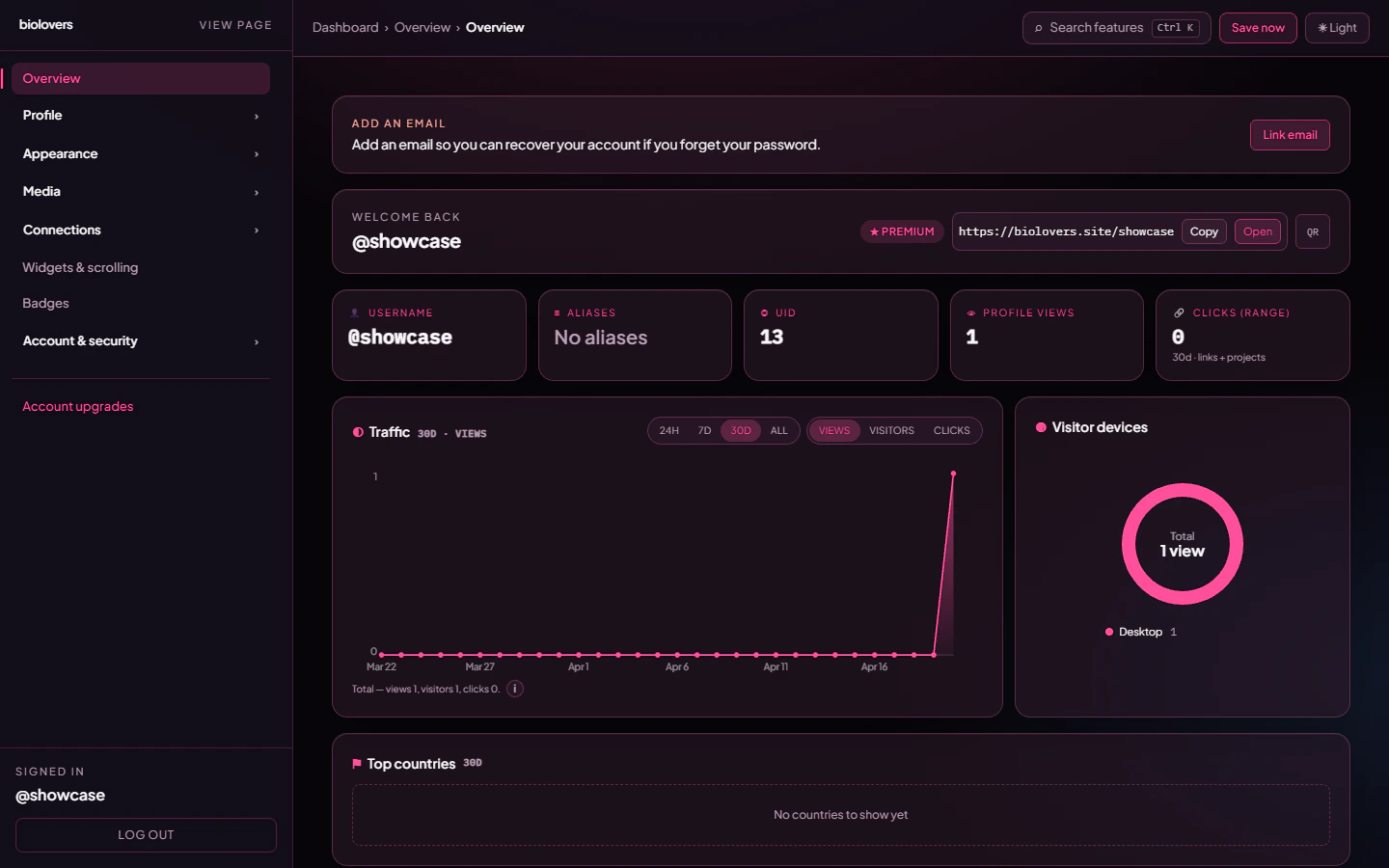
The Overview tab tells you how your page is doing.
 ## The header bar
| Thing | What it is |
| ------------------------------- | ------------------------------------------------------------------------------------------------------------------- |
| **Welcome back / display name** | Just hello text. |
| **Premium badge** | Shown if your account has Premium. |
| **Public link box** | Your full profile URL — tap **Copy** to put it on the clipboard, or **Open** to view your public page in a new tab. |
| **QR button** | Drops down a QR code to your page so you can let someone scan it on their phone. |
## The five small tiles
| Tile | What it shows |
| ------------------ | ------------------------------------------------------------------------------------------------------ |
| **Username** | The `@username` you signed up with. |
| **Aliases** | Your alias slug (`/aka`) if you set one, or "No aliases". See [Domain & URL](/profile/domain-and-url). |
| **UID** | Your numeric account ID. Never changes. |
| **Profile views** | All-time view count — one per visitor IP per UTC month. |
| **Clicks (range)** | Total taps on social links + project cards in the time range you picked below. |
## Range and metric switches
Two pill rows control what the charts show:
* **Range:** `24h` / `7d` / `30d` / `All`. The whole tab re-fetches when you change this.
* **Metric:** `Views` / `Visitors` / `Clicks`. Only the **Traffic** chart switches.
**Views vs Visitors:** views count every page load that wasn't deduped; visitors count distinct fingerprints in the range. Reloading your own page in the same UTC month from the same IP only counts once towards views.
## Traffic chart
Line + area chart of the metric you picked, broken into:
* **24h range** — one point per hour (UTC).
* **Other ranges** — one point per day (UTC).
Hover a dot to see the exact number for that bucket.
## Visitor devices donut
Pie of `Desktop / Mobile / Tablet / Unknown` based on the user-agent. Filled in once you have at least one tracked view in the range.
## Top countries
Bar chart of country codes (`US`, `DE`, `BR`, …) in the chosen range. Country comes from the visitor's IP — VPN users may show as a different country.
## Top clicked links
The top 10 social link chips visitors tapped, with the URL underneath each label.
## Top clicked projects
Same idea, but for **project / portfolio cards** inside your widgets.
## Top clicked integrations
Taps on the **View Profile / Listen / Join** buttons of your live tiles (GitHub card, Spotify card, Steam card, Discord card, server invite).
## How counting actually works
The exact rules, straight from the API:
* **Views** are deduped **once per IP per UTC month** for the all-time `Profile views` tile, and **once per IP per UTC day** for the day-bucketed traffic chart. Reload your page from the same IP in the same window — only the first tap counts.
* **Owner visits do count.** Browsing your own page from the dashboard tab still increments the view counter — there's no owner filter on the view endpoint. If you want a clean number, use a private window with a different IP / VPN.
* **Bots are filtered out.** Requests that look like crawlers (Discord card preview, Twitter card, Google bot, etc.) are detected by user-agent and **not** counted.
* **Clicks are not deduped.** Every tap on a social link / project / integration tile is recorded, including repeated taps from the same visitor. Counting shows raw taps.
* **Numbers refresh on the next view.** They aren't real-time to the second.
## Common questions
No. We don't log identities. Only aggregate numbers + country + device.
Either your link hasn't been shared yet, or all the visits happened before the range you picked. Try **All** to see everything.
Click tracking does not dedupe — each tap records. If you genuinely see 0, the page may have been served as a bot (uncommon for a manual click) or the link is being opened with a middle-click that the page didn't see.
Tapping the call-to-action on a live tile (View Profile, Listen on Spotify, Watch on YouTube, Join Server, etc.). Just looking at the card is **not** a click.
They do. Use a private window with a different IP / VPN to view your page without counting.
## Related
Pick a memorable URL and an alias.
Spotify, YouTube, Twitch, Steam, GitHub.
## The header bar
| Thing | What it is |
| ------------------------------- | ------------------------------------------------------------------------------------------------------------------- |
| **Welcome back / display name** | Just hello text. |
| **Premium badge** | Shown if your account has Premium. |
| **Public link box** | Your full profile URL — tap **Copy** to put it on the clipboard, or **Open** to view your public page in a new tab. |
| **QR button** | Drops down a QR code to your page so you can let someone scan it on their phone. |
## The five small tiles
| Tile | What it shows |
| ------------------ | ------------------------------------------------------------------------------------------------------ |
| **Username** | The `@username` you signed up with. |
| **Aliases** | Your alias slug (`/aka`) if you set one, or "No aliases". See [Domain & URL](/profile/domain-and-url). |
| **UID** | Your numeric account ID. Never changes. |
| **Profile views** | All-time view count — one per visitor IP per UTC month. |
| **Clicks (range)** | Total taps on social links + project cards in the time range you picked below. |
## Range and metric switches
Two pill rows control what the charts show:
* **Range:** `24h` / `7d` / `30d` / `All`. The whole tab re-fetches when you change this.
* **Metric:** `Views` / `Visitors` / `Clicks`. Only the **Traffic** chart switches.
**Views vs Visitors:** views count every page load that wasn't deduped; visitors count distinct fingerprints in the range. Reloading your own page in the same UTC month from the same IP only counts once towards views.
## Traffic chart
Line + area chart of the metric you picked, broken into:
* **24h range** — one point per hour (UTC).
* **Other ranges** — one point per day (UTC).
Hover a dot to see the exact number for that bucket.
## Visitor devices donut
Pie of `Desktop / Mobile / Tablet / Unknown` based on the user-agent. Filled in once you have at least one tracked view in the range.
## Top countries
Bar chart of country codes (`US`, `DE`, `BR`, …) in the chosen range. Country comes from the visitor's IP — VPN users may show as a different country.
## Top clicked links
The top 10 social link chips visitors tapped, with the URL underneath each label.
## Top clicked projects
Same idea, but for **project / portfolio cards** inside your widgets.
## Top clicked integrations
Taps on the **View Profile / Listen / Join** buttons of your live tiles (GitHub card, Spotify card, Steam card, Discord card, server invite).
## How counting actually works
The exact rules, straight from the API:
* **Views** are deduped **once per IP per UTC month** for the all-time `Profile views` tile, and **once per IP per UTC day** for the day-bucketed traffic chart. Reload your page from the same IP in the same window — only the first tap counts.
* **Owner visits do count.** Browsing your own page from the dashboard tab still increments the view counter — there's no owner filter on the view endpoint. If you want a clean number, use a private window with a different IP / VPN.
* **Bots are filtered out.** Requests that look like crawlers (Discord card preview, Twitter card, Google bot, etc.) are detected by user-agent and **not** counted.
* **Clicks are not deduped.** Every tap on a social link / project / integration tile is recorded, including repeated taps from the same visitor. Counting shows raw taps.
* **Numbers refresh on the next view.** They aren't real-time to the second.
## Common questions
No. We don't log identities. Only aggregate numbers + country + device.
Either your link hasn't been shared yet, or all the visits happened before the range you picked. Try **All** to see everything.
Click tracking does not dedupe — each tap records. If you genuinely see 0, the page may have been served as a bot (uncommon for a manual click) or the link is being opened with a middle-click that the page didn't see.
Tapping the call-to-action on a live tile (View Profile, Listen on Spotify, Watch on YouTube, Join Server, etc.). Just looking at the card is **not** a click.
They do. Use a private window with a different IP / VPN to view your page without counting.
## Related
Pick a memorable URL and an alias.
Spotify, YouTube, Twitch, Steam, GitHub.