> ## Documentation Index
> Fetch the complete documentation index at: https://help.biolovers.site/llms.txt
> Use this file to discover all available pages before exploring further.
# Click-to-enter splash
> An optional intro screen visitors tap before your real profile shows. The splash background can be an image or a video, and the after-splash reveal animation is Premium.
Page on the dashboard: dashboard.biolovers.site/dashboard/edit/media/splash
A "click to enter" overlay that shows **before** your profile. Two upsides: it gives a dramatic reveal, and it lets background music start (browsers block autoplay until the visitor interacts with the page).
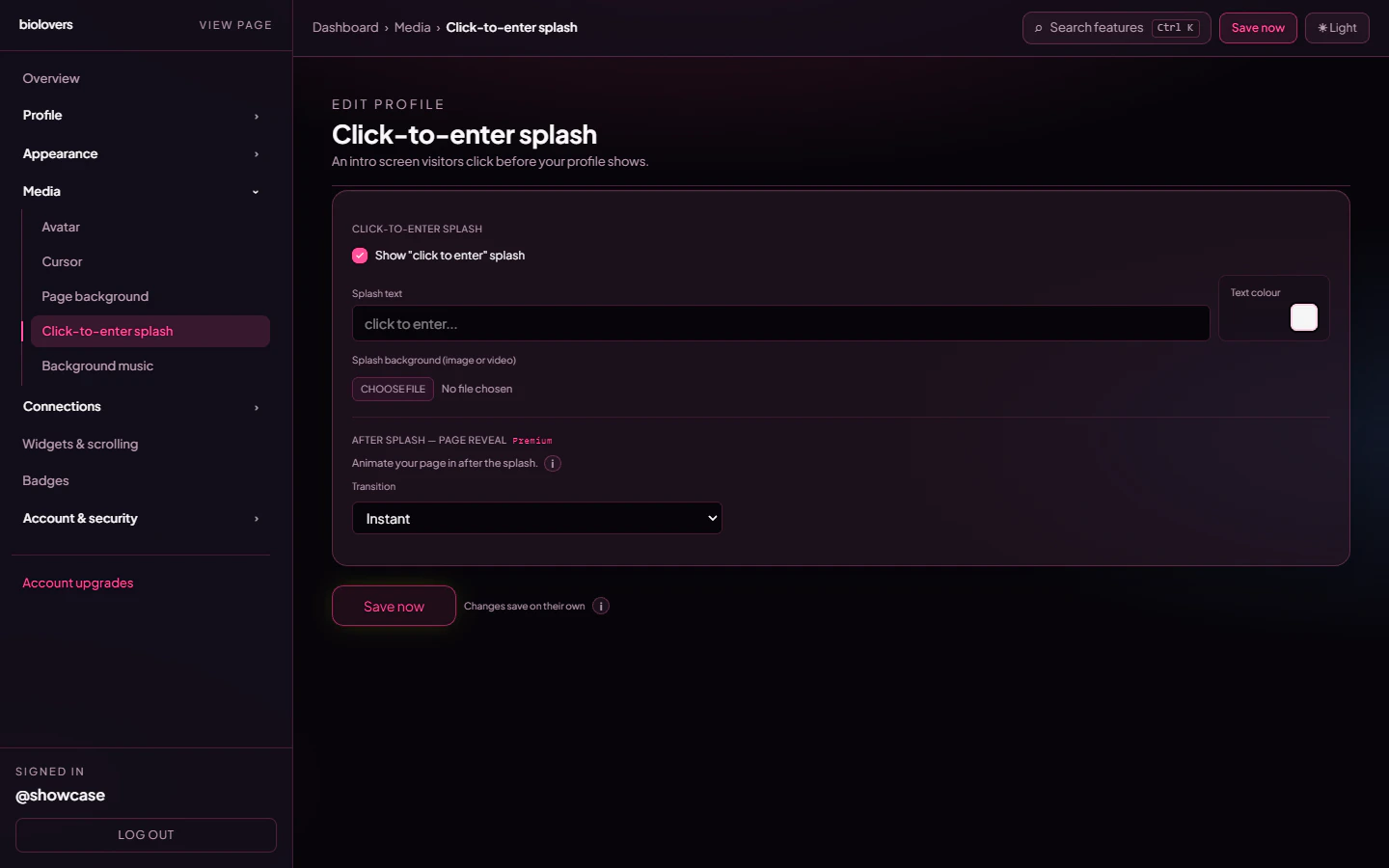 ## Turn it on
Tick **Show "click to enter" splash** at the top of the panel. Off = visitors land on your profile immediately.
## Splash text
A single text input — the big text in the middle of the splash. Up to 200 characters. Placeholder is `click to enter…`.
Premium accounts also get a **Text colour** swatch right next to the field for the splash text. Free accounts use the entry-gate default colour.
## Splash background (image or video)
One file upload — accepts:
| Type | Formats |
| --------- | ----------------------- |
| **Image** | JPEG / PNG / WebP / GIF |
| **Video** | MP4 / WebM / MOV |
The same upload slot handles both. Yes, the splash background can be a **video** — it's not limited to still images.
The preview shows your file with a Remove button.
## After splash — page reveal *(Premium)*
A separate group below the upload, gated to Premium. It controls the animation that plays once the visitor taps:
| Setting | Values |
| -------------- | ------------------------------------------------------------------------ |
| **Transition** | **Instant** *(default)*, **Fade in**, **Fade + expand**. |
| **Duration** | Slider `0.20 s` – `4.00 s`, only visible when Transition is non-Instant. |
Free accounts see this section disabled with the Premium upsell line. The reveal mode list is the real list — there's no `Slide up` / `Zoom out` / `Cut` mode.
## Why use a splash
* **Music autoplay** — browsers will block audio until the user interacts. The splash *is* that interaction.
* **Drama** — a darker splash → bright profile reveal feels intentional.
* **First impression** — show a logo / single image (or short video) while the rest of the page loads.
## Why skip a splash
* One extra tap before visitors see your stuff. People in a hurry may bail.
* SEO bots ignore the splash but you make humans wait an extra second.
## Common questions
That's the reveal animation playing. Premium accounts can tune it via **Transition** / **Duration**, or set Transition to **Instant** for no animation.
See [Audio won't autoplay](/troubleshooting/audio-autoplay).
Yes — the splash background upload accepts MP4 / WebM / MOV directly.
Yes — the page view is counted as soon as the page loads, even if the visitor never taps the splash.
## Turn it on
Tick **Show "click to enter" splash** at the top of the panel. Off = visitors land on your profile immediately.
## Splash text
A single text input — the big text in the middle of the splash. Up to 200 characters. Placeholder is `click to enter…`.
Premium accounts also get a **Text colour** swatch right next to the field for the splash text. Free accounts use the entry-gate default colour.
## Splash background (image or video)
One file upload — accepts:
| Type | Formats |
| --------- | ----------------------- |
| **Image** | JPEG / PNG / WebP / GIF |
| **Video** | MP4 / WebM / MOV |
The same upload slot handles both. Yes, the splash background can be a **video** — it's not limited to still images.
The preview shows your file with a Remove button.
## After splash — page reveal *(Premium)*
A separate group below the upload, gated to Premium. It controls the animation that plays once the visitor taps:
| Setting | Values |
| -------------- | ------------------------------------------------------------------------ |
| **Transition** | **Instant** *(default)*, **Fade in**, **Fade + expand**. |
| **Duration** | Slider `0.20 s` – `4.00 s`, only visible when Transition is non-Instant. |
Free accounts see this section disabled with the Premium upsell line. The reveal mode list is the real list — there's no `Slide up` / `Zoom out` / `Cut` mode.
## Why use a splash
* **Music autoplay** — browsers will block audio until the user interacts. The splash *is* that interaction.
* **Drama** — a darker splash → bright profile reveal feels intentional.
* **First impression** — show a logo / single image (or short video) while the rest of the page loads.
## Why skip a splash
* One extra tap before visitors see your stuff. People in a hurry may bail.
* SEO bots ignore the splash but you make humans wait an extra second.
## Common questions
That's the reveal animation playing. Premium accounts can tune it via **Transition** / **Duration**, or set Transition to **Instant** for no animation.
See [Audio won't autoplay](/troubleshooting/audio-autoplay).
Yes — the splash background upload accepts MP4 / WebM / MOV directly.
Yes — the page view is counted as soon as the page loads, even if the visitor never taps the splash.