> ## Documentation Index
> Fetch the complete documentation index at: https://help.biolovers.site/llms.txt
> Use this file to discover all available pages before exploring further.
# Background music
> Songs that play on your page. Free gets 1 track; Premium up to 5. Real player controls: hide bar, inside-card / below-card placement, music bar panel & blur.
Page on the dashboard: dashboard.biolovers.site/dashboard/edit/media/audio
Songs that play while visitors are on your page. Free accounts get one track; Premium up to five.
 ## Add a track
* Pick a file in the upload slot.
* Formats: **MP3 (audio/mpeg) / OGG / WAV / M4A / MP4 audio**. **FLAC is not supported.**
* **Max 8 MiB per file.**
* Title and artist are read from the file's embedded tags. If they're missing, we show the filename.
## Slots
| Tier | Tracks |
| ----------- | ----------------------------------------------------- |
| **Free** | 1 track. |
| **Premium** | Up to **5 tracks**, with skip controls on the player. |
## Reorder tracks (the ↑ / ↓ arrows)
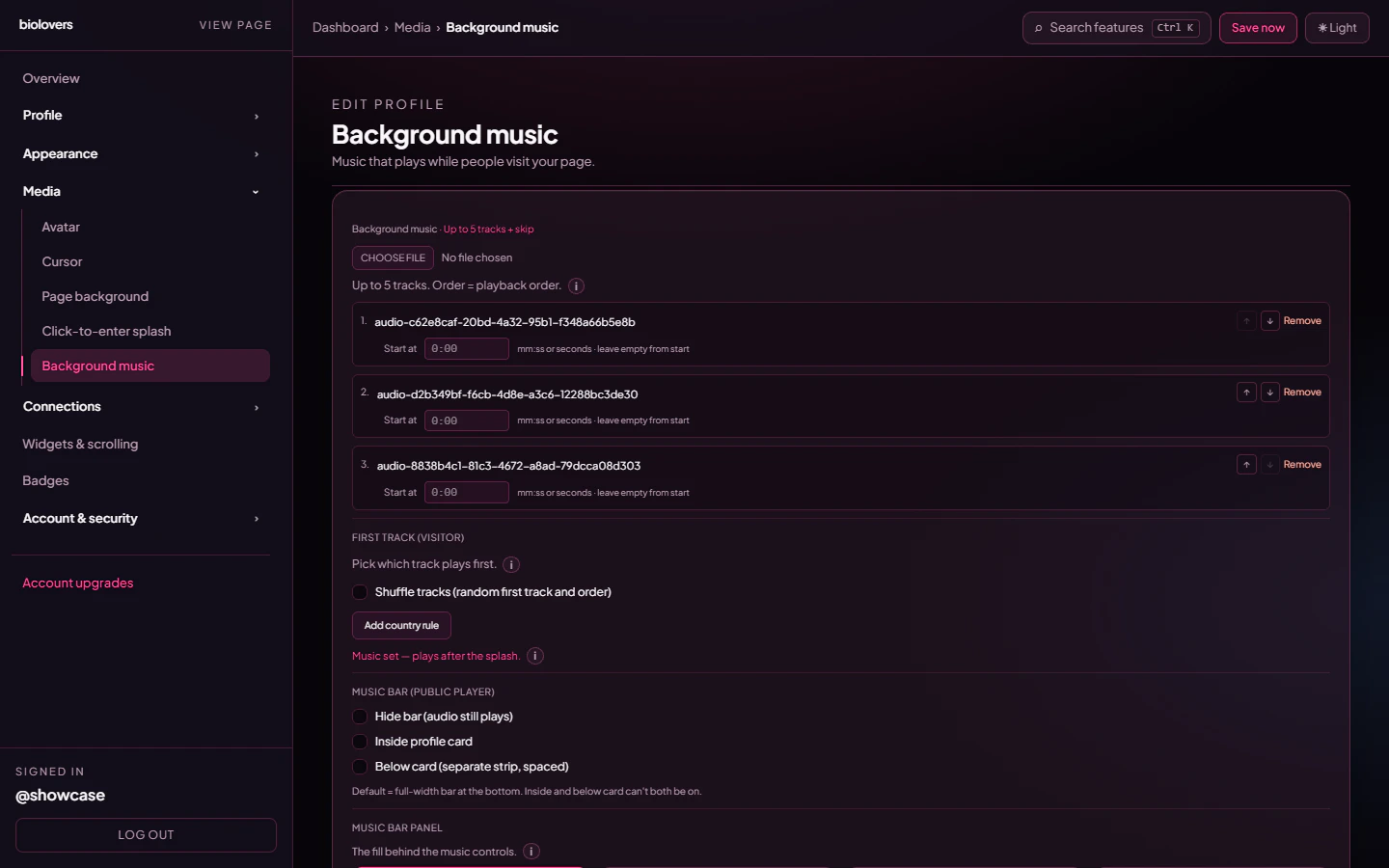
Each track row has **↑** and **↓** buttons next to **Remove**. Tap them to move that track up or down in the list. **There is no drag-and-drop** — use the arrows. Track 1 (top) is the default starting song; the player walks down the list from there.
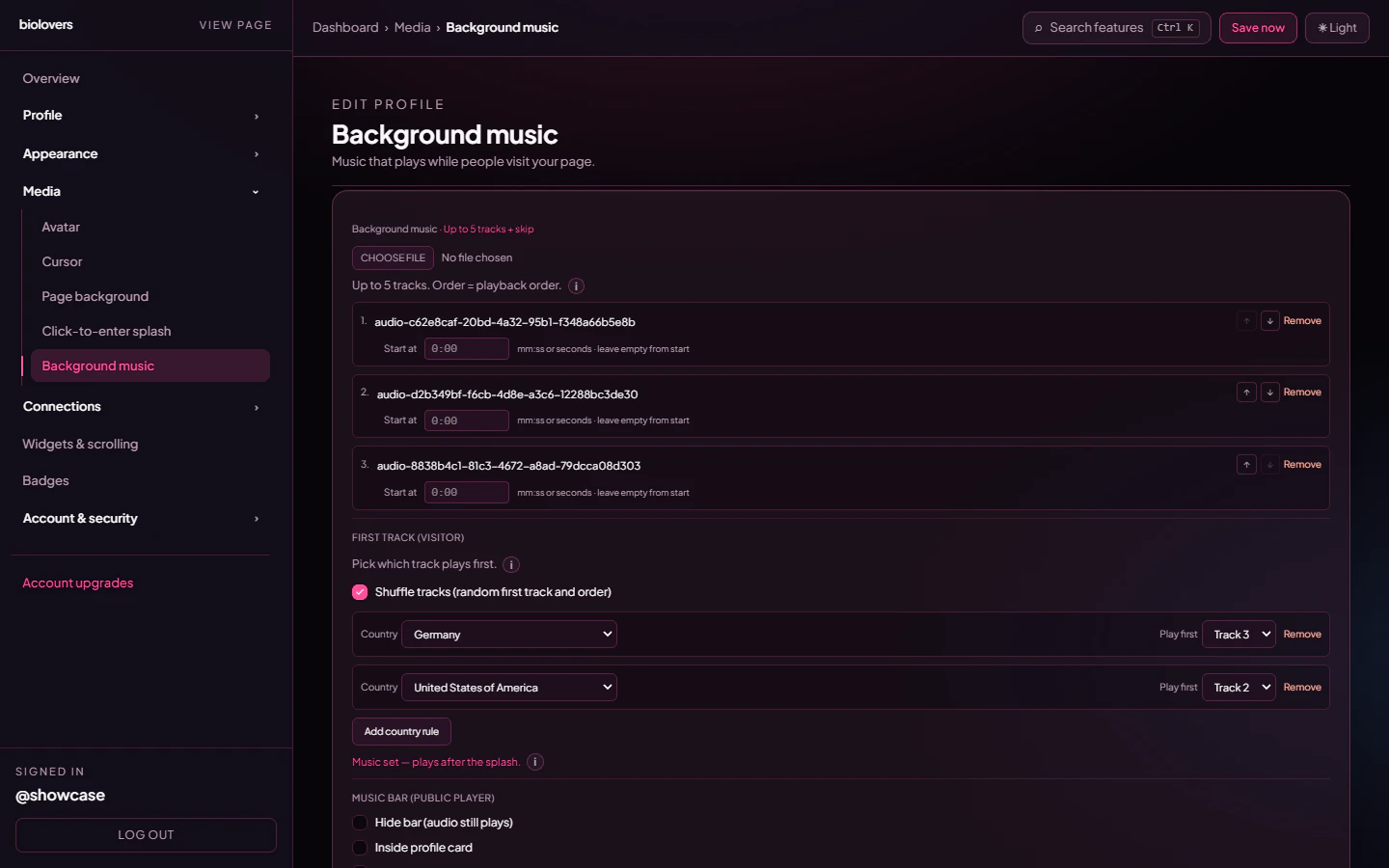
In the screenshot above the third row's **↑** is enabled and the first row's **↑** is disabled (greyed out) because it's already at the top — same for the last row's **↓**.
## Per-track start offset
Each row has a **Start at** field (`mm:ss` or seconds, e.g. `0:30`, `45`). Leave empty to start from the beginning. Useful for skipping intros.
## Shuffle (Premium)
When you have **at least two tracks** and you're on Premium, the **First track (visitor)** section unlocks. Tick **Shuffle tracks (random first track and order)** to randomise the starting track on every visit *and* shuffle the rest of the queue:
## Add a track
* Pick a file in the upload slot.
* Formats: **MP3 (audio/mpeg) / OGG / WAV / M4A / MP4 audio**. **FLAC is not supported.**
* **Max 8 MiB per file.**
* Title and artist are read from the file's embedded tags. If they're missing, we show the filename.
## Slots
| Tier | Tracks |
| ----------- | ----------------------------------------------------- |
| **Free** | 1 track. |
| **Premium** | Up to **5 tracks**, with skip controls on the player. |
## Reorder tracks (the ↑ / ↓ arrows)
Each track row has **↑** and **↓** buttons next to **Remove**. Tap them to move that track up or down in the list. **There is no drag-and-drop** — use the arrows. Track 1 (top) is the default starting song; the player walks down the list from there.
In the screenshot above the third row's **↑** is enabled and the first row's **↑** is disabled (greyed out) because it's already at the top — same for the last row's **↓**.
## Per-track start offset
Each row has a **Start at** field (`mm:ss` or seconds, e.g. `0:30`, `45`). Leave empty to start from the beginning. Useful for skipping intros.
## Shuffle (Premium)
When you have **at least two tracks** and you're on Premium, the **First track (visitor)** section unlocks. Tick **Shuffle tracks (random first track and order)** to randomise the starting track on every visit *and* shuffle the rest of the queue:
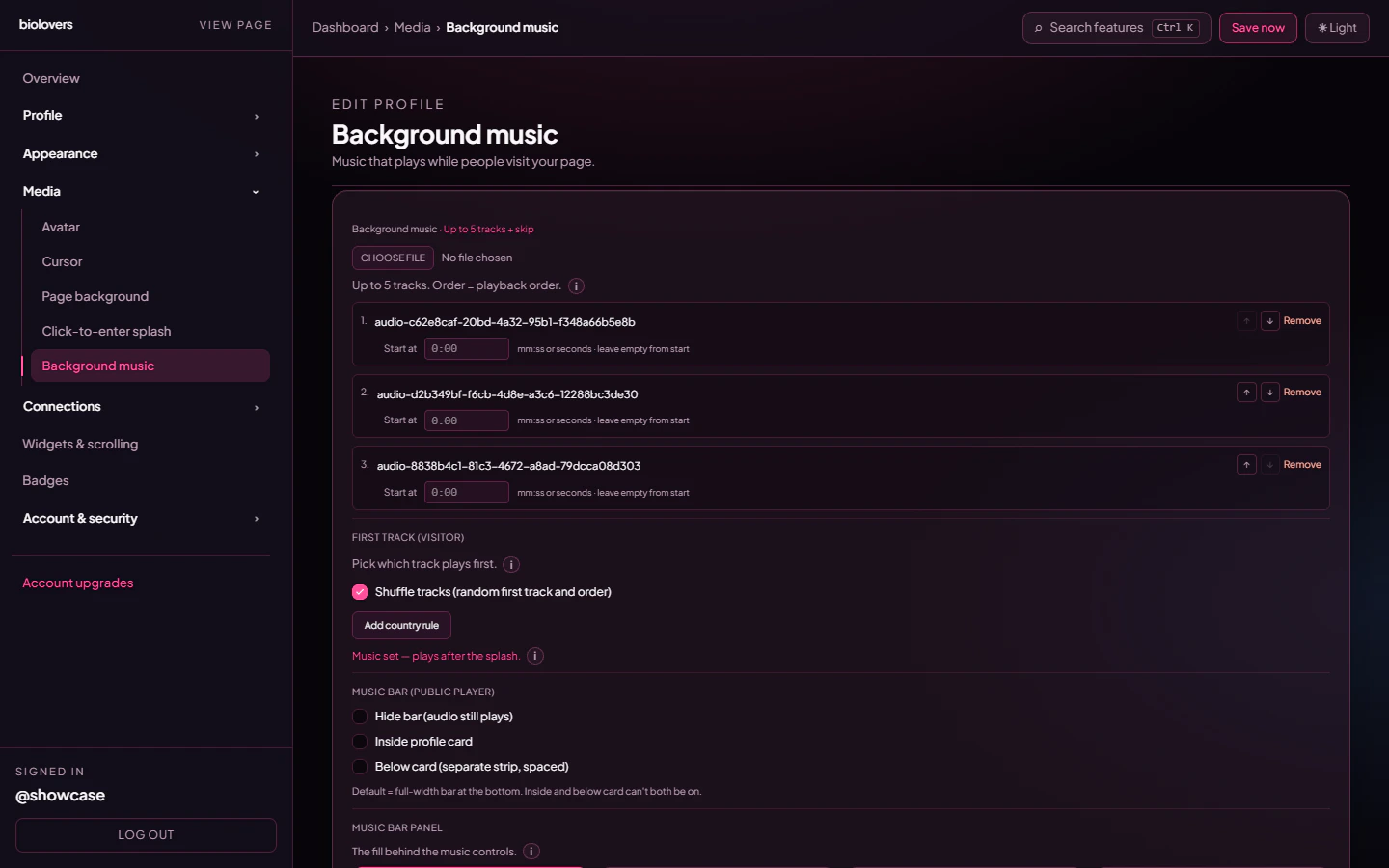 The shuffle re-picks on the client after hydration, so CDN caching never locks visitors into the same "random" track.
## Country rules — pick a starting track per country (Premium)
Click **Add country rule** to add a row. Each rule is **Country** (dropdown of every ISO country) + **Play first** (which track number plays first for visitors from that country). Visitors from a listed country always hear that track first; everyone else falls back to shuffle (if on) or Track 1.
The shuffle re-picks on the client after hydration, so CDN caching never locks visitors into the same "random" track.
## Country rules — pick a starting track per country (Premium)
Click **Add country rule** to add a row. Each rule is **Country** (dropdown of every ISO country) + **Play first** (which track number plays first for visitors from that country). Visitors from a listed country always hear that track first; everyone else falls back to shuffle (if on) or Track 1.
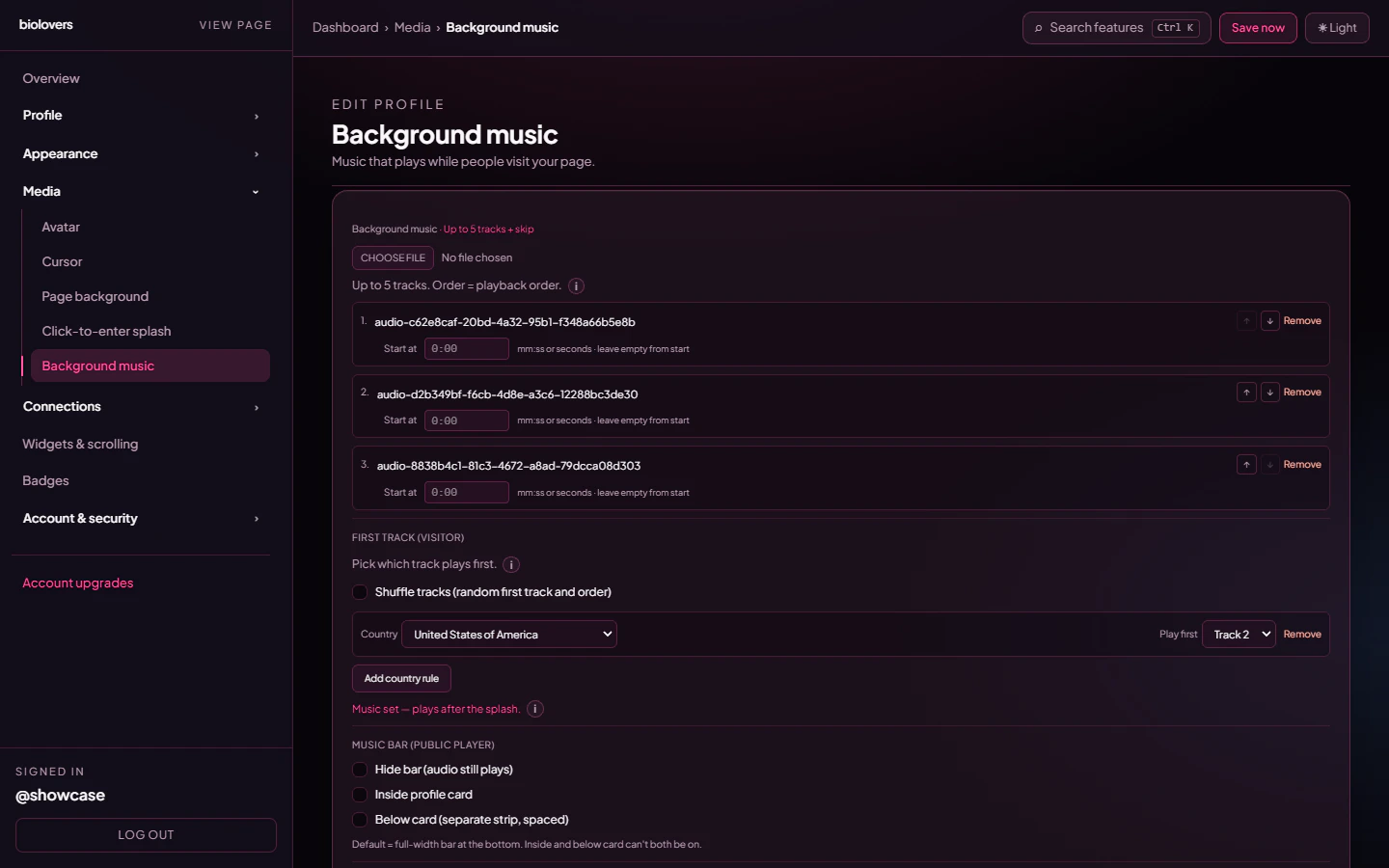 Add as many rules as you want — each country can only be used once (already-mapped countries disappear from the dropdown for the other rows). Hit **Remove** on a row to delete it.
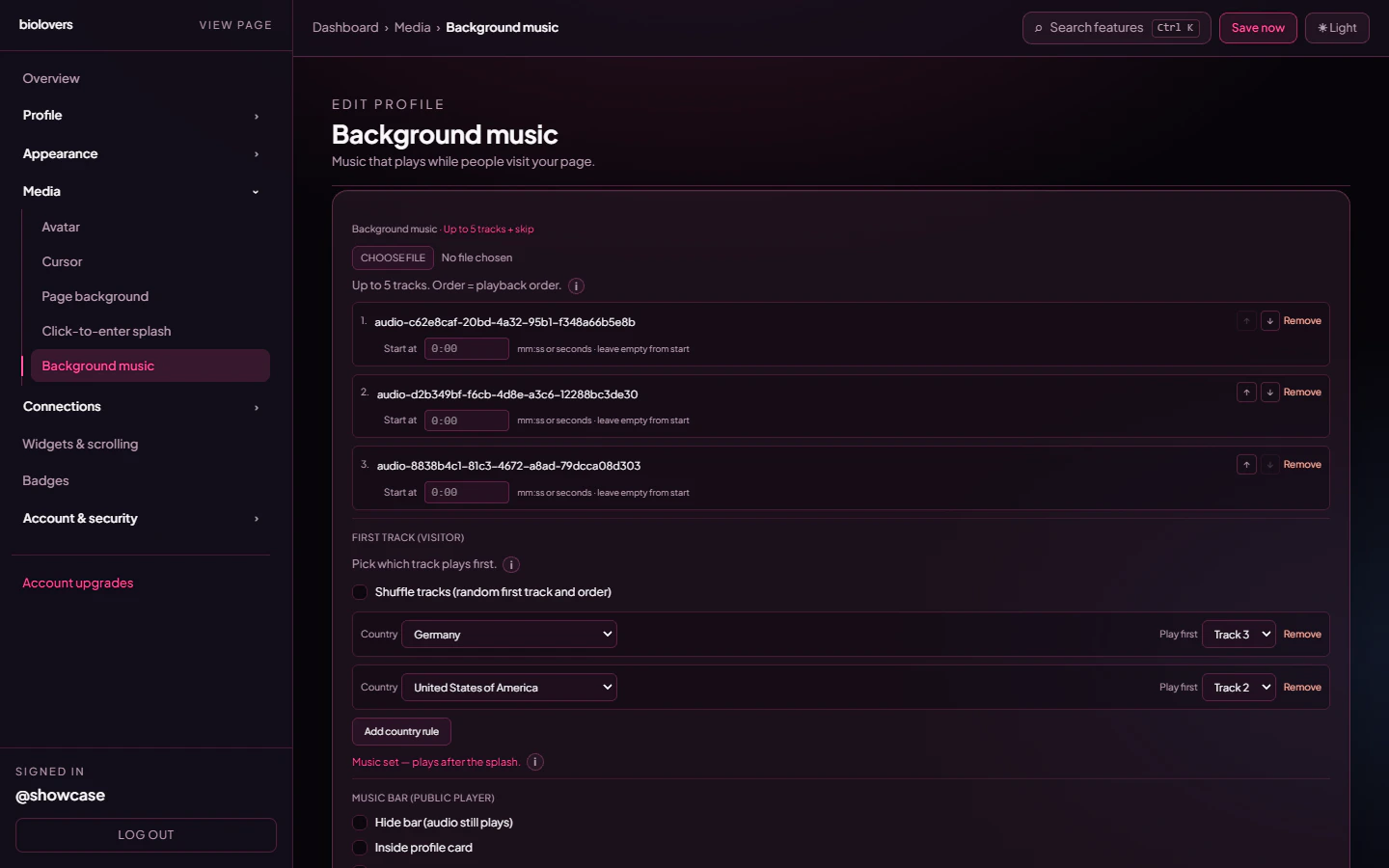 You can combine **Shuffle** with country rules — countries with a rule get their assigned track first, *everyone else* gets the random shuffle:
 Free users see this whole section as a Premium upsell instead of the controls.
## Music bar (the on-page player)
After at least one track is uploaded, the **Music bar (public player)** section unlocks. The real toggles are:
| Toggle | What it does |
| --------------------------------------- | ------------------------------------------------------------------------------------------------------------------- |
| **Hide bar (audio still plays)** | The bar is invisible to visitors but the song still plays. |
| **Inside profile card** | Music bar lives inside the card frame instead of at the bottom of the page. Mutually exclusive with **Below card**. |
| **Below card (separate strip, spaced)** | A separate strip beneath the card, with a small gap. Mutually exclusive with **Inside profile card**. |
Default (both off) is a **full-width bar at the bottom of the page**.
There are **no** dashboard toggles for **autoplay**, **loop**, **shuffle** (free), or **default volume** — playback is autoplay-on-tap, looping, in upload order, with the visitor controlling the volume from the player itself. The "music starts after the splash" behaviour is automatic when [Splash](/media/splash) is enabled.
## Music bar panel (the bar's chrome)
Below the placement toggles, **Music bar panel** picks the fill behind the controls:
| Option | What it does |
| ---------------- | ---------------------------------------------------------------------------- |
| **Site default** | Match the profile card panel — bar reuses the same glass and tint. |
| **Solid** | Fully opaque dark panel. |
| **Glass** | Frosted, semi-transparent. |
| **Transparent** | No panel fill — the controls float on the page background. **Premium-only.** |
## Music bar blur (Premium)
Opt-in checkbox + slider, `0–50 px`. Override the panel's baked-in blur. Only visible on glass / transparent music bar panels.
## Tips
* Pair a splash screen with music. The visitor's tap on the splash counts as the interaction browsers need to allow audio.
* Loud tracks sound *much* louder than the visitor expects. Normalize your tracks before upload.
* For Premium playlists, group songs by mood — there's no per-track crossfade.
## Common questions
See the dedicated page: [Audio won't autoplay](/troubleshooting/audio-autoplay). Adding a [splash](/media/splash) is the most reliable fix.
YouTube Audio Library, Free Music Archive, or buy a track on Bandcamp / royalty-free libraries. Don't upload songs you don't have rights to — DMCA takedowns can suspend your profile.
Check the file is under 8 MiB and is one of MP3 / OGG / WAV / M4A. FLAC is rejected — re-encode it as 192 kbps MP3.
Not as background music. You can show a Spotify / SoundCloud embed in a [widget](/widgets/embed) — but the embed has its own play button, not autoplay.
The dashboard uses ↑ / ↓ arrow buttons on each track row, not drag-and-drop.
Free users see this whole section as a Premium upsell instead of the controls.
## Music bar (the on-page player)
After at least one track is uploaded, the **Music bar (public player)** section unlocks. The real toggles are:
| Toggle | What it does |
| --------------------------------------- | ------------------------------------------------------------------------------------------------------------------- |
| **Hide bar (audio still plays)** | The bar is invisible to visitors but the song still plays. |
| **Inside profile card** | Music bar lives inside the card frame instead of at the bottom of the page. Mutually exclusive with **Below card**. |
| **Below card (separate strip, spaced)** | A separate strip beneath the card, with a small gap. Mutually exclusive with **Inside profile card**. |
Default (both off) is a **full-width bar at the bottom of the page**.
There are **no** dashboard toggles for **autoplay**, **loop**, **shuffle** (free), or **default volume** — playback is autoplay-on-tap, looping, in upload order, with the visitor controlling the volume from the player itself. The "music starts after the splash" behaviour is automatic when [Splash](/media/splash) is enabled.
## Music bar panel (the bar's chrome)
Below the placement toggles, **Music bar panel** picks the fill behind the controls:
| Option | What it does |
| ---------------- | ---------------------------------------------------------------------------- |
| **Site default** | Match the profile card panel — bar reuses the same glass and tint. |
| **Solid** | Fully opaque dark panel. |
| **Glass** | Frosted, semi-transparent. |
| **Transparent** | No panel fill — the controls float on the page background. **Premium-only.** |
## Music bar blur (Premium)
Opt-in checkbox + slider, `0–50 px`. Override the panel's baked-in blur. Only visible on glass / transparent music bar panels.
## Tips
* Pair a splash screen with music. The visitor's tap on the splash counts as the interaction browsers need to allow audio.
* Loud tracks sound *much* louder than the visitor expects. Normalize your tracks before upload.
* For Premium playlists, group songs by mood — there's no per-track crossfade.
## Common questions
See the dedicated page: [Audio won't autoplay](/troubleshooting/audio-autoplay). Adding a [splash](/media/splash) is the most reliable fix.
YouTube Audio Library, Free Music Archive, or buy a track on Bandcamp / royalty-free libraries. Don't upload songs you don't have rights to — DMCA takedowns can suspend your profile.
Check the file is under 8 MiB and is one of MP3 / OGG / WAV / M4A. FLAC is rejected — re-encode it as 192 kbps MP3.
Not as background music. You can show a Spotify / SoundCloud embed in a [widget](/widgets/embed) — but the embed has its own play button, not autoplay.
The dashboard uses ↑ / ↓ arrow buttons on each track row, not drag-and-drop.