> ## Documentation Index
> Fetch the complete documentation index at: https://help.biolovers.site/llms.txt
> Use this file to discover all available pages before exploring further.
# Two-step sign-in (2FA)
> Add a 6-digit authenticator code on top of your password. Quick setup with Google Authenticator, Authy, 1Password, or any TOTP app.
Page on the dashboard: dashboard.biolovers.site/dashboard/edit/account/two-factor
## What 2FA does
After you turn it on, signing in needs **two** things:
1. Your password (something you know).
2. A 6-digit code from an authenticator app on your phone (something you have).
Even if someone steals your password they can't log in without your phone.
## What you need
Any **TOTP** authenticator app:
* [Google Authenticator](https://safety.google/authentication/) (iOS / Android)
* [Authy](https://authy.com/)
* [1Password](https://1password.com/) (built in)
* [Bitwarden](https://bitwarden.com/) (built in)
* Microsoft Authenticator, Aegis, Raivo — any of them work.
## Turn it on (2 minutes)
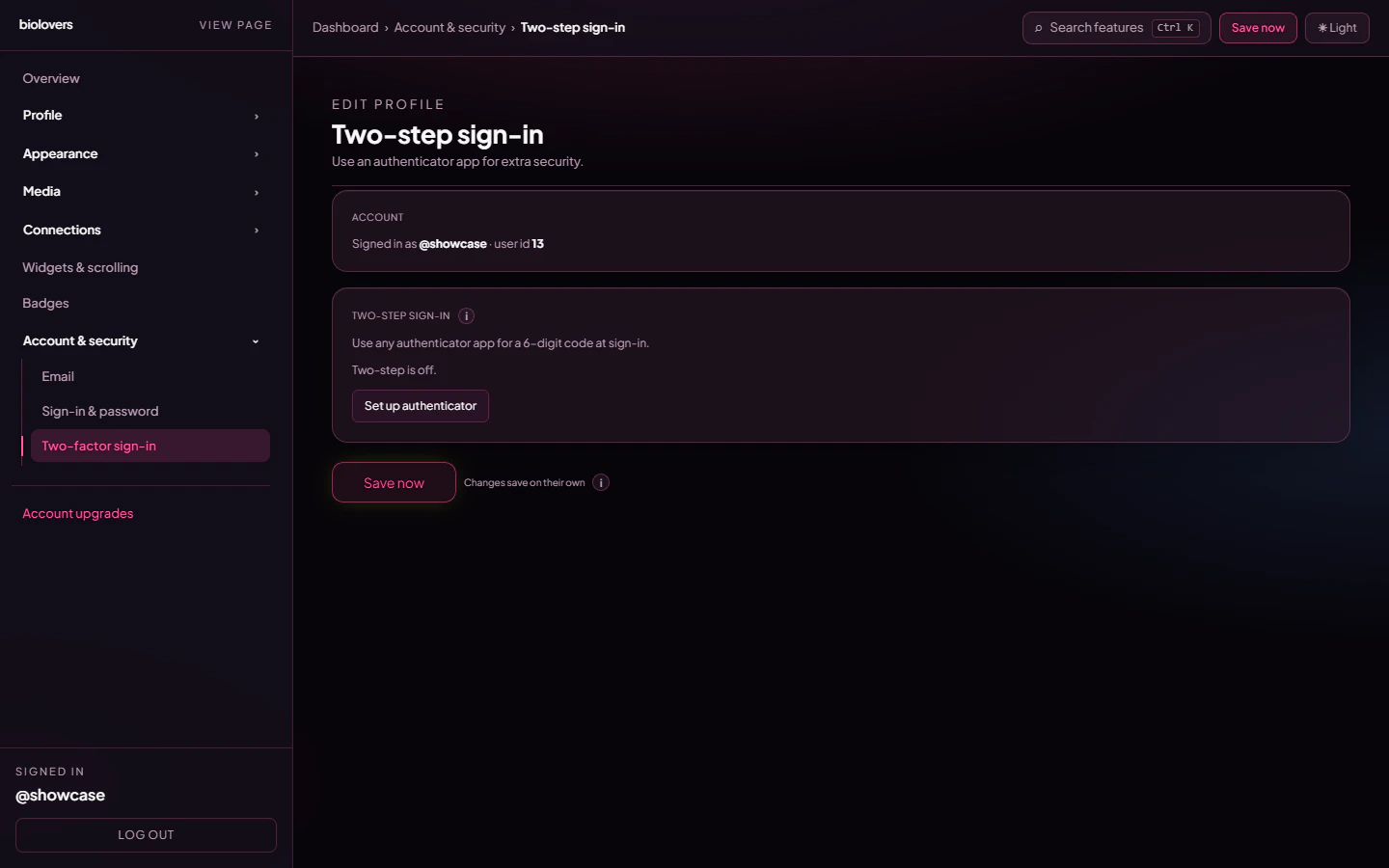 1. Open the [Two-step sign-in panel](https://dashboard.biolovers.site/dashboard/edit/account/two-factor).
2. Tap **Set up authenticator**. We show a **QR code** and a long secret string.
3. In your authenticator app, tap **Add** → **Scan QR code** → point at your screen.
* Can't scan? Tap **enter manually** in the app and type the secret.
4. Your app starts spitting out a **6-digit code that changes every 30 seconds**.
5. Type the current code into the dashboard and tap **Confirm & enable**.
6. Done. Next login will ask for an authenticator code.
Add the same secret to a **second** device or a password manager. If you only have it on one phone and that phone dies, recovering is annoying — see [I lost my 2FA](/troubleshooting/lost-2fa).
## Turn it off
On the same panel:
1. Type your account password into the **Password (to disable 2FA)** field.
2. Tap **Disable 2FA**.
## Lost the device
See [I lost my 2FA](/troubleshooting/lost-2fa). Short version: if you set up the same TOTP secret on a backup device or password manager, use that. Otherwise, open a ticket in our [Discord](https://biolovers.site/discord) or use the [contact form](https://biolovers.site/contact).
## Common questions
No — only TOTP apps. SMS is widely considered insecure (SIM-swap attacks) and is not supported.
Yes. Either scan the QR with both, or copy the secret to a password manager that does TOTP. Both will produce the same code.
Check that your phone's clock is set to **automatic** time. TOTP codes are time-based — if your phone clock drifts more than \~30s the code looks wrong to the server.
No. The email reset only changes your password — your TOTP setting stays as-is. If both your password **and** your authenticator are gone, see [I lost my 2FA](/troubleshooting/lost-2fa).
1. Open the [Two-step sign-in panel](https://dashboard.biolovers.site/dashboard/edit/account/two-factor).
2. Tap **Set up authenticator**. We show a **QR code** and a long secret string.
3. In your authenticator app, tap **Add** → **Scan QR code** → point at your screen.
* Can't scan? Tap **enter manually** in the app and type the secret.
4. Your app starts spitting out a **6-digit code that changes every 30 seconds**.
5. Type the current code into the dashboard and tap **Confirm & enable**.
6. Done. Next login will ask for an authenticator code.
Add the same secret to a **second** device or a password manager. If you only have it on one phone and that phone dies, recovering is annoying — see [I lost my 2FA](/troubleshooting/lost-2fa).
## Turn it off
On the same panel:
1. Type your account password into the **Password (to disable 2FA)** field.
2. Tap **Disable 2FA**.
## Lost the device
See [I lost my 2FA](/troubleshooting/lost-2fa). Short version: if you set up the same TOTP secret on a backup device or password manager, use that. Otherwise, open a ticket in our [Discord](https://biolovers.site/discord) or use the [contact form](https://biolovers.site/contact).
## Common questions
No — only TOTP apps. SMS is widely considered insecure (SIM-swap attacks) and is not supported.
Yes. Either scan the QR with both, or copy the secret to a password manager that does TOTP. Both will produce the same code.
Check that your phone's clock is set to **automatic** time. TOTP codes are time-based — if your phone clock drifts more than \~30s the code looks wrong to the server.
No. The email reset only changes your password — your TOTP setting stays as-is. If both your password **and** your authenticator are gone, see [I lost my 2FA](/troubleshooting/lost-2fa).