> ## Documentation Index
> Fetch the complete documentation index at: https://help.biolovers.site/llms.txt
> Use this file to discover all available pages before exploring further.
# Make an account
> Sign up for Biolovers in about a minute — pick a username, set a password, optionally add an email so you can reset later.
Page on the dashboard: dashboard.biolovers.site/register
 ## Fastest way: Discord or Google
Below the form there are two buttons — **Continue with Discord** and **Continue with Google**. One click creates your account: no username to pick, no password to set. We use your provider profile to set things up and sign you in.
The best part is the email — your **verified email from Discord or Google is filled in automatically**, and it counts as verified right away. That means you can buy upgrades or reset a password later without the manual add-and-verify step a typed signup needs.
* **Continue with Discord** — matched to your Discord account. If you don't have an account here yet, one is created from your Discord profile.
* **Continue with Google** — matched to your Google account. If the verified Google email already belongs to an account here, Google is linked to that account and you're signed in; otherwise a new account is created.
The same two buttons are on the [Log in](/getting-started/log-in) page, so you use them whether you're new or coming back.
### Choose your username
Because a Discord or Google signup doesn't ask you to type a username, we start you off with one based on your provider name. The first time you open the dashboard, a **Choose your username** prompt appears:
* Keep the suggested handle, or type your own (1–32 characters: letters, numbers, underscores, hyphens).
* This first pick is **free** and doesn't use the Premium one-rename allowance.
Your public page is live the whole time — the prompt just lets you set the handle you actually want before sharing it. You can still rename later from the [Username panel](/account/username) (Premium).
## What you fill in
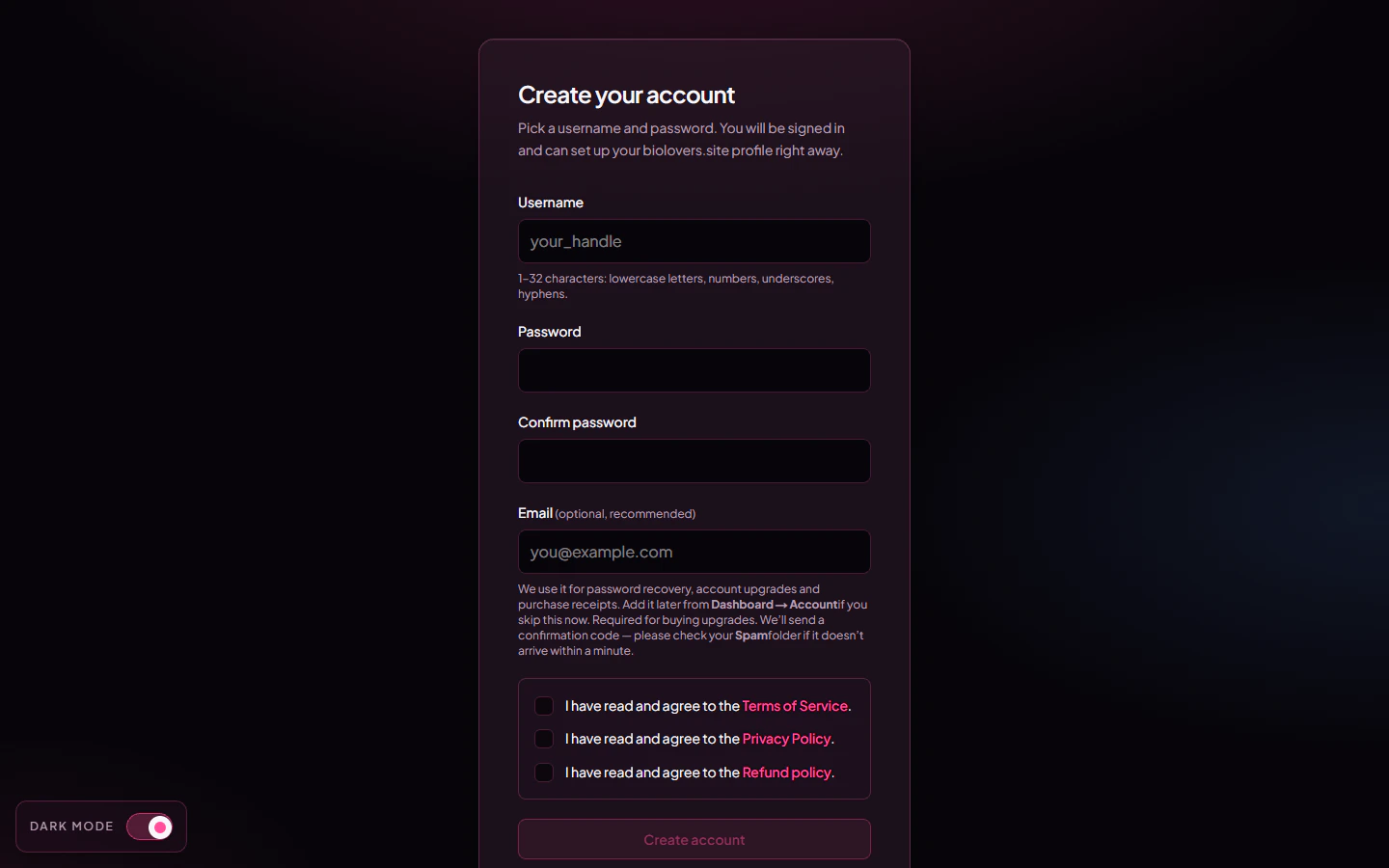
| Field | What it does |
| ----------------------------------- | -------------------------------------------------------------------------------------------------------------------------------------------------------------------------------------------------------------------- |
| **Username** | Your public page URL becomes `biolovers.site/`. 1–32 characters: letters (any case), numbers, underscores, or hyphens. You can rename later (Premium gets one rename — see [Username](/account/username)). |
| **Password** | At least 8 characters. We hash it before saving — we never see the original. |
| **Confirm password** | Has to match the field above. |
| **Email** *(optional, recommended)* | If you add one, we send a 6-digit code to confirm it. Used for password resets and purchase receipts. You can add or change it any time from the dashboard. **Required to buy any upgrade.** |
| **Terms / Privacy / Refund** | Three checkboxes you have to tick before the button works. |
The submit button reads **Create account** if you skipped email, or **Send verification code** if you added one. With an email, you'll then see a "Confirm your email" step asking for the 6-digit code from your inbox.
You **don't have to** add an email at sign-up. But if you ever forget your password and have no email on file, the only path back in is reaching out to us via [Discord](https://biolovers.site/discord) or the [contact form](https://biolovers.site/contact) and proving the account is yours — see [No email and forgot password](/troubleshooting/no-email-no-password). Adding the email later is one click in [Email](/account/email).
## After you sign up
You land on the **dashboard** (the `/edit` page). From there:
1. Open [Profile → Domain & URL](/profile/domain-and-url) to confirm your username.
2. Open [Profile → Name & about me](/profile/name-and-about) to set your display name and bio.
3. Open [Media → Avatar](/media/avatar) to upload a profile picture.
4. Open `biolovers.site/` in a new tab to **preview your page**.
## Common questions
Yes. The free tier covers everything except the Premium-only extras listed in [what Premium unlocks](/premium/what-premium-unlocks). No credit card needed at signup.
Premium accounts get one rename from the [Username panel](/account/username). Capitalisation tweaks (e.g. `yuno` → `Yuno`) are unlimited and don't count as the rename. Old links to the old username won't redirect, so tell people the new one.
The form will tell you and refuse to submit. Pick another, or add numbers / underscores / hyphens. You can also set an **alias slug** later (a second URL that points at the same page — Premium feature).
Check **Spam / Promotions** first — codes can land there. The verify step has a **Resend code** button. Codes expire after 15 minutes; if it's still missing after a resend, double-check the address you typed.
## Next
Sign back in next time.
Reset by email if you've added one.
## Fastest way: Discord or Google
Below the form there are two buttons — **Continue with Discord** and **Continue with Google**. One click creates your account: no username to pick, no password to set. We use your provider profile to set things up and sign you in.
The best part is the email — your **verified email from Discord or Google is filled in automatically**, and it counts as verified right away. That means you can buy upgrades or reset a password later without the manual add-and-verify step a typed signup needs.
* **Continue with Discord** — matched to your Discord account. If you don't have an account here yet, one is created from your Discord profile.
* **Continue with Google** — matched to your Google account. If the verified Google email already belongs to an account here, Google is linked to that account and you're signed in; otherwise a new account is created.
The same two buttons are on the [Log in](/getting-started/log-in) page, so you use them whether you're new or coming back.
### Choose your username
Because a Discord or Google signup doesn't ask you to type a username, we start you off with one based on your provider name. The first time you open the dashboard, a **Choose your username** prompt appears:
* Keep the suggested handle, or type your own (1–32 characters: letters, numbers, underscores, hyphens).
* This first pick is **free** and doesn't use the Premium one-rename allowance.
Your public page is live the whole time — the prompt just lets you set the handle you actually want before sharing it. You can still rename later from the [Username panel](/account/username) (Premium).
## What you fill in
| Field | What it does |
| ----------------------------------- | -------------------------------------------------------------------------------------------------------------------------------------------------------------------------------------------------------------------- |
| **Username** | Your public page URL becomes `biolovers.site/`. 1–32 characters: letters (any case), numbers, underscores, or hyphens. You can rename later (Premium gets one rename — see [Username](/account/username)). |
| **Password** | At least 8 characters. We hash it before saving — we never see the original. |
| **Confirm password** | Has to match the field above. |
| **Email** *(optional, recommended)* | If you add one, we send a 6-digit code to confirm it. Used for password resets and purchase receipts. You can add or change it any time from the dashboard. **Required to buy any upgrade.** |
| **Terms / Privacy / Refund** | Three checkboxes you have to tick before the button works. |
The submit button reads **Create account** if you skipped email, or **Send verification code** if you added one. With an email, you'll then see a "Confirm your email" step asking for the 6-digit code from your inbox.
You **don't have to** add an email at sign-up. But if you ever forget your password and have no email on file, the only path back in is reaching out to us via [Discord](https://biolovers.site/discord) or the [contact form](https://biolovers.site/contact) and proving the account is yours — see [No email and forgot password](/troubleshooting/no-email-no-password). Adding the email later is one click in [Email](/account/email).
## After you sign up
You land on the **dashboard** (the `/edit` page). From there:
1. Open [Profile → Domain & URL](/profile/domain-and-url) to confirm your username.
2. Open [Profile → Name & about me](/profile/name-and-about) to set your display name and bio.
3. Open [Media → Avatar](/media/avatar) to upload a profile picture.
4. Open `biolovers.site/` in a new tab to **preview your page**.
## Common questions
Yes. The free tier covers everything except the Premium-only extras listed in [what Premium unlocks](/premium/what-premium-unlocks). No credit card needed at signup.
Premium accounts get one rename from the [Username panel](/account/username). Capitalisation tweaks (e.g. `yuno` → `Yuno`) are unlimited and don't count as the rename. Old links to the old username won't redirect, so tell people the new one.
The form will tell you and refuse to submit. Pick another, or add numbers / underscores / hyphens. You can also set an **alias slug** later (a second URL that points at the same page — Premium feature).
Check **Spam / Promotions** first — codes can land there. The verify step has a **Resend code** button. Codes expire after 15 minutes; if it's still missing after a resend, double-check the address you typed.
## Next
Sign back in next time.
Reset by email if you've added one.