> ## Documentation Index
> Fetch the complete documentation index at: https://help.biolovers.site/llms.txt
> Use this file to discover all available pages before exploring further.
# Social link chips
> The small icon row of buttons that link to your other accounts. Each chip is auto-iconned from a preset; Premium can recolour the icon.
Page on the dashboard: dashboard.biolovers.site/dashboard/edit/connect/socials
The small **icon-only chips** people tap to open your other accounts. Different from the bigger [live tiles](/connections/social-integrations).
 ## Add a chip
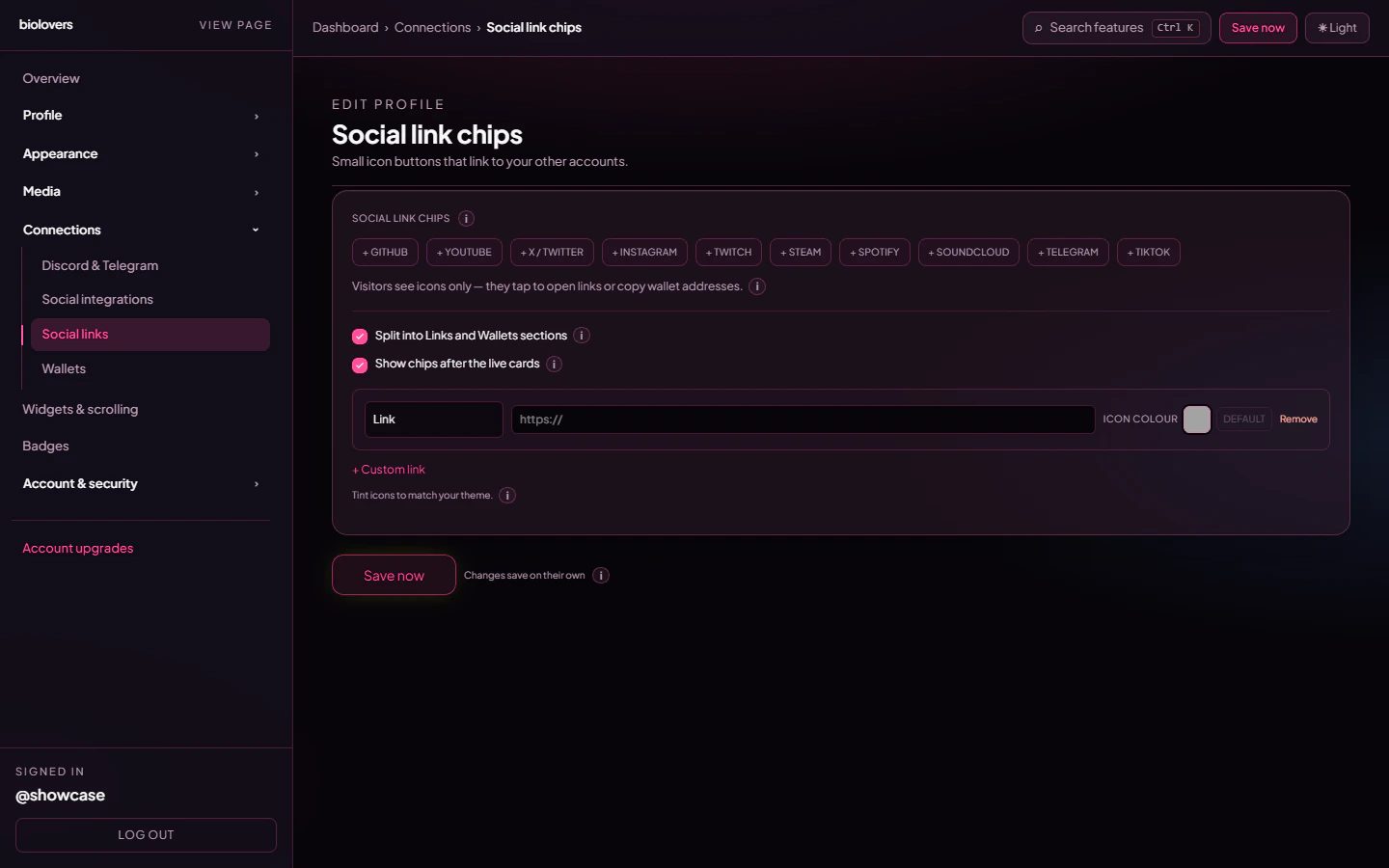
The panel shows a row of **+ Discord**, **+ GitHub**, **+ YouTube**, **+ X / Twitter**, **+ Instagram**, **+ Twitch**, **+ Steam**, **+ Spotify**, **+ SoundCloud**, **+ Telegram**, **+ TikTok** quick-add buttons. Tap one to add an empty row pre-set to that platform's icon, then paste your URL.
For anything not in the preset list, tap **+ Custom link** at the bottom of the row list — the chip pulls the destination site's **favicon** automatically once you paste the URL. (No SVG / image upload UI exists per chip — the icon comes from the preset or favicon.)
## Per-row controls
| Control | What it does |
| --------------- | ---------------------------------------------------------------------------------------------------------------------------------------------------------------------------------------------------- |
| **Label** | Editable for **+ Custom link** rows only. Catalog rows show their preset name (read-only) so screen readers can announce it. Cap 40 chars. |
| **URL** | The destination link. Auto-prepended with `https://` on save. |
| **Icon colour** | Swatch + **Default** button. **Premium-only**: pick a hex tint for the icon, or hit Default to revert to the artwork uploaded by admin. Free accounts see a `Default · ★ Premium` chip in this slot. |
| **Remove** | Drops the row. |
## Panel-wide options
* **Split into Links and Wallets sections** — when on, the public chip grid shows two headed groups; off = one combined grid.
* **Show chips after the live cards** *(default on)* — places the chip row below your live tiles. Off = chips sit between Discord/Telegram and the widgets, the classic layout. The same toggle is mirrored on the [Social integrations](/connections/social-integrations) panel.
## Reorder
Re-add in the desired order or remove and re-create — there's no drag-to-reorder UI on this panel today.
## Common questions
Free chips render with the original brand artwork. **Premium** unlocks the per-chip **Icon colour** swatch so you can tint each icon to match your accent.
Make sure the URL points to a real domain (e.g. `https://example.com/yourname` rather than `example.com`). The favicon is grabbed from the destination origin a few seconds after you paste.
Yes — tap **+ Discord** and paste your `discord.gg/...` URL. To show the **server card** (icon, online member count, Join button) instead, use the [Discord & Telegram](/connections/discord-telegram) panel.
The URL needs your full profile path (e.g. `https://instagram.com/yourname`), not just `instagram.com`.
Premium only. The **Icon colour** swatch sits to the right of each row, with a **Default** button to clear the tint.
## Add a chip
The panel shows a row of **+ Discord**, **+ GitHub**, **+ YouTube**, **+ X / Twitter**, **+ Instagram**, **+ Twitch**, **+ Steam**, **+ Spotify**, **+ SoundCloud**, **+ Telegram**, **+ TikTok** quick-add buttons. Tap one to add an empty row pre-set to that platform's icon, then paste your URL.
For anything not in the preset list, tap **+ Custom link** at the bottom of the row list — the chip pulls the destination site's **favicon** automatically once you paste the URL. (No SVG / image upload UI exists per chip — the icon comes from the preset or favicon.)
## Per-row controls
| Control | What it does |
| --------------- | ---------------------------------------------------------------------------------------------------------------------------------------------------------------------------------------------------- |
| **Label** | Editable for **+ Custom link** rows only. Catalog rows show their preset name (read-only) so screen readers can announce it. Cap 40 chars. |
| **URL** | The destination link. Auto-prepended with `https://` on save. |
| **Icon colour** | Swatch + **Default** button. **Premium-only**: pick a hex tint for the icon, or hit Default to revert to the artwork uploaded by admin. Free accounts see a `Default · ★ Premium` chip in this slot. |
| **Remove** | Drops the row. |
## Panel-wide options
* **Split into Links and Wallets sections** — when on, the public chip grid shows two headed groups; off = one combined grid.
* **Show chips after the live cards** *(default on)* — places the chip row below your live tiles. Off = chips sit between Discord/Telegram and the widgets, the classic layout. The same toggle is mirrored on the [Social integrations](/connections/social-integrations) panel.
## Reorder
Re-add in the desired order or remove and re-create — there's no drag-to-reorder UI on this panel today.
## Common questions
Free chips render with the original brand artwork. **Premium** unlocks the per-chip **Icon colour** swatch so you can tint each icon to match your accent.
Make sure the URL points to a real domain (e.g. `https://example.com/yourname` rather than `example.com`). The favicon is grabbed from the destination origin a few seconds after you paste.
Yes — tap **+ Discord** and paste your `discord.gg/...` URL. To show the **server card** (icon, online member count, Join button) instead, use the [Discord & Telegram](/connections/discord-telegram) panel.
The URL needs your full profile path (e.g. `https://instagram.com/yourname`), not just `instagram.com`.
Premium only. The **Icon colour** swatch sits to the right of each row, with a **Default** button to clear the tint.