> ## Documentation Index
> Fetch the complete documentation index at: https://help.biolovers.site/llms.txt
> Use this file to discover all available pages before exploring further.
# Live tiles (social integrations)
> Bigger cards that show public stats from Spotify, YouTube, Twitch, GitHub, Steam, and the rest of the supported platforms.
Page on the dashboard: dashboard.biolovers.site/dashboard/edit/connect/live
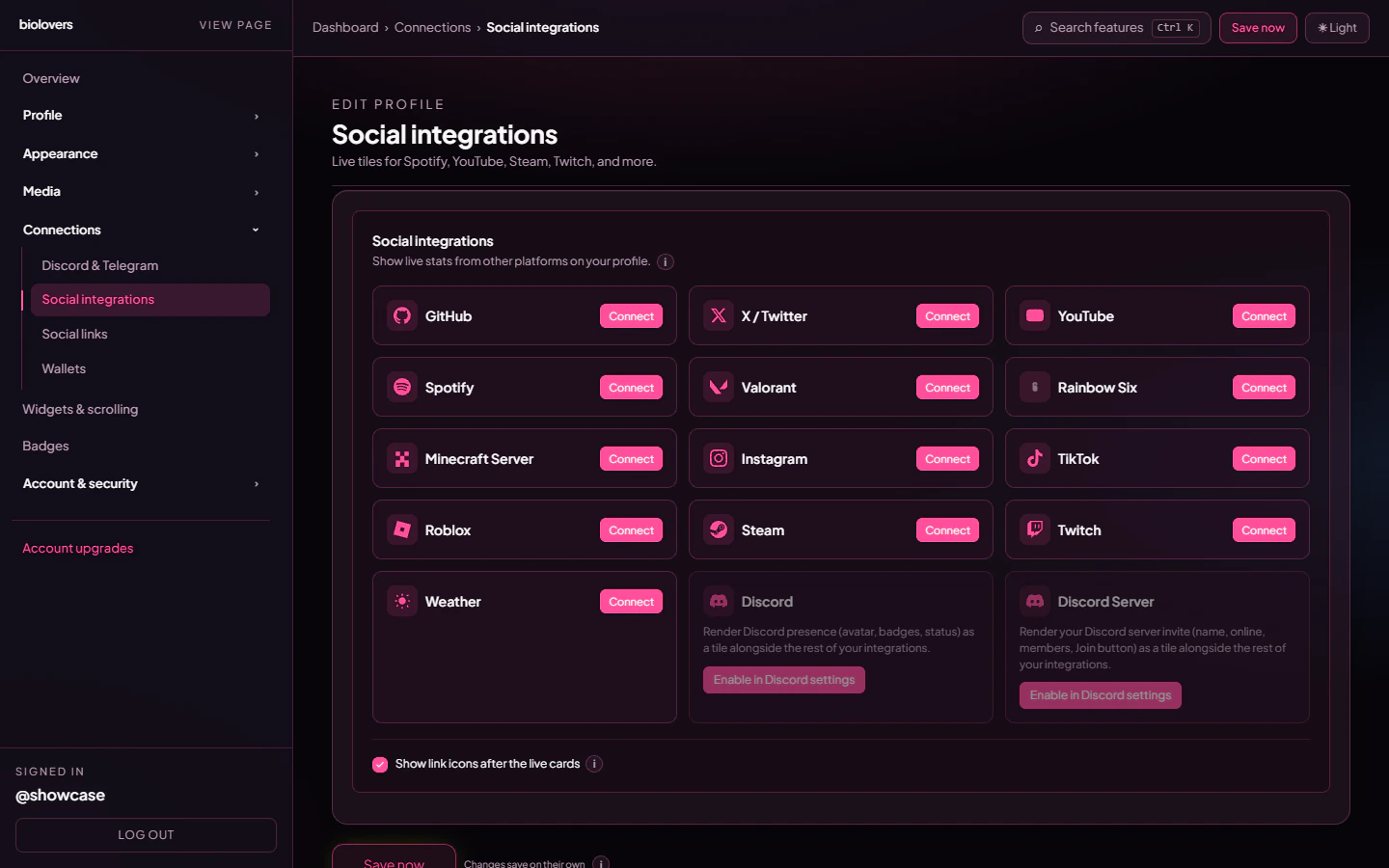
Live tiles are the **bigger cards** that pull cached public data from other platforms — your channel info, follower counts, ranks, server status, etc. Different from the small **social link chips** in the next panel.
**Rainbow Six:** this panel shows **rank and level** on the **Rainbow Six** tile. **Mouse sens** is a different feature — add the [Gaming settings](/widgets/gaming-settings) widget and the **Rainbow Six Siege** catalog game. Step-by-step for both: [Rainbow Six Siege on your profile](/widgets/rainbow-six-siege).
 ## What's available
The platform picker offers exactly these 13 tiles, plus two pseudo-tiles (Discord & Discord Server) backed by your linked Discord and configured server invite:
| Platform | What the tile shows | Identifier |
| ----------------------------- | ----------------------------------------------------------------------------------------------- | --------------------------------------------------------------------------------------------------------------------------------------------------------------------------------------- |
| **GitHub** | Avatar, name, bio, public repos, followers, following. | GitHub username. |
| **X / Twitter** | Display name, handle, avatar, bio, follower count. | Handle without `@`. |
| **YouTube** | Channel name, avatar, subscribers, total views, video count. | Channel URL or `@handle`. |
| **Spotify** | Artist / playlist / track info: name, followers, monthly listeners, plays. | Artist, playlist, or track URL. |
| **Twitch** | Display name, avatar, follower count, bio. (No live-stream embed — public stats only.) | Twitch username. |
| **Steam** | Username, avatar, level, real name, profile link. | Vanity URL or numeric profile ID. |
| **Valorant** | Display name, current rank + icon, peak rank, level. | Riot ID `Name#TAG`. |
| **Rainbow Six** | Display name, current rank, peak rank, Champion #, level. | In-game **name on platform**; set **Platform** (PC / PlayStation / Xbox) and **Display rank** (current vs peak) on the tile after you add it. [Siege guide](/widgets/rainbow-six-siege) |
| **Minecraft Server** | Server name, IP, online status, player count, MOTD, icon. | Server IP. |
| **Instagram** | Display name, handle, avatar, follower count, bio. | Username. |
| **TikTok** | Display name, handle, avatar, follower count, like count, bio. | Username without `@`. |
| **Roblox** | Display name, username, avatar, follower count, account-created date. | Numeric Roblox user ID. |
| **Weather** | City, country, temp °C / °F, condition + icon, local time. | City name. |
| **Discord** *(pseudo)* | Same data as the Discord card on the [Discord & Telegram](/connections/discord-telegram) panel. | Linked Discord account (auto). |
| **Discord Server** *(pseudo)* | Same data as the server invite card. | Server invite URL. |
The pseudo-Discord tiles only appear when you've linked Discord / configured a server invite **and** ticked the corresponding toggle on the Discord panel.
## Add an integration
1. Pick a platform from the picker.
2. Type the **identifier** the picker hints at (the `Identifier` column above).
3. Pick a **display style** (the size / chrome of the card — each platform has 2-4 options).
4. Save. The first fetch happens immediately.
## Refresh cadence
Refresh interval is per-platform, set in the source code's `PLATFORM_TTL` map. A few examples:
* **GitHub**, **Roblox** — 6 hours.
* **YouTube**, **Spotify**, **Steam**, **Twitter**, **Instagram**, **TikTok** — 1 hour.
* **Twitch** — 15 minutes.
* **Minecraft / Weather** — 5 minutes.
Free **and** Premium tiles use the same TTL refresh. Premium adds an extra **staggered \~6 h re-poll** across all your tiles to spread API load. Either tier sees the most recent cached snapshot rendered immediately on page load.
## Per-tile options
| Option | What it does |
| -------------------- | -------------------------------------------------------------------------------------------------------------- |
| **Display style** | Card chrome / size for that platform. |
| **Card blur** | Backdrop blur for glass cards (one of `SOCIAL_CARD_BLUR_OPTIONS_PX`, default ≈ `SOCIAL_CARD_DEFAULT_BLUR_PX`). |
| **Section** | Which scroll page the tile belongs to. |
| **Enable / disable** | Hide without losing config. |
| **Sort order** | Position in the grid. |
## Show chips after the live cards
The same toggle that lives on [Social links](/connections/social-links). When on, the social link chip row appears under your tiles; when off, the chips sit higher up (between Discord / Telegram and the widgets).
## Common questions
Not on this tile — the Spotify integration shows public artist / playlist / track stats. **Now-playing** lives on the **Discord card**, which surfaces your Spotify activity reported by Discord. See [Discord & Telegram](/connections/discord-telegram).
The YouTube TTL is 1 hour. Premium gets an extra \~6 h re-poll on top, but a single tile won't refresh faster than 1 h.
Set your Steam **profile** + **game details** privacy to public in Steam settings. Without this our scraper can't read your data.
**This panel** = big live cards with cached refreshing data. **Social links** = small static icon chips that just open URLs.
## Related
The smaller icon row.
Discord presence + server invite.
## What's available
The platform picker offers exactly these 13 tiles, plus two pseudo-tiles (Discord & Discord Server) backed by your linked Discord and configured server invite:
| Platform | What the tile shows | Identifier |
| ----------------------------- | ----------------------------------------------------------------------------------------------- | --------------------------------------------------------------------------------------------------------------------------------------------------------------------------------------- |
| **GitHub** | Avatar, name, bio, public repos, followers, following. | GitHub username. |
| **X / Twitter** | Display name, handle, avatar, bio, follower count. | Handle without `@`. |
| **YouTube** | Channel name, avatar, subscribers, total views, video count. | Channel URL or `@handle`. |
| **Spotify** | Artist / playlist / track info: name, followers, monthly listeners, plays. | Artist, playlist, or track URL. |
| **Twitch** | Display name, avatar, follower count, bio. (No live-stream embed — public stats only.) | Twitch username. |
| **Steam** | Username, avatar, level, real name, profile link. | Vanity URL or numeric profile ID. |
| **Valorant** | Display name, current rank + icon, peak rank, level. | Riot ID `Name#TAG`. |
| **Rainbow Six** | Display name, current rank, peak rank, Champion #, level. | In-game **name on platform**; set **Platform** (PC / PlayStation / Xbox) and **Display rank** (current vs peak) on the tile after you add it. [Siege guide](/widgets/rainbow-six-siege) |
| **Minecraft Server** | Server name, IP, online status, player count, MOTD, icon. | Server IP. |
| **Instagram** | Display name, handle, avatar, follower count, bio. | Username. |
| **TikTok** | Display name, handle, avatar, follower count, like count, bio. | Username without `@`. |
| **Roblox** | Display name, username, avatar, follower count, account-created date. | Numeric Roblox user ID. |
| **Weather** | City, country, temp °C / °F, condition + icon, local time. | City name. |
| **Discord** *(pseudo)* | Same data as the Discord card on the [Discord & Telegram](/connections/discord-telegram) panel. | Linked Discord account (auto). |
| **Discord Server** *(pseudo)* | Same data as the server invite card. | Server invite URL. |
The pseudo-Discord tiles only appear when you've linked Discord / configured a server invite **and** ticked the corresponding toggle on the Discord panel.
## Add an integration
1. Pick a platform from the picker.
2. Type the **identifier** the picker hints at (the `Identifier` column above).
3. Pick a **display style** (the size / chrome of the card — each platform has 2-4 options).
4. Save. The first fetch happens immediately.
## Refresh cadence
Refresh interval is per-platform, set in the source code's `PLATFORM_TTL` map. A few examples:
* **GitHub**, **Roblox** — 6 hours.
* **YouTube**, **Spotify**, **Steam**, **Twitter**, **Instagram**, **TikTok** — 1 hour.
* **Twitch** — 15 minutes.
* **Minecraft / Weather** — 5 minutes.
Free **and** Premium tiles use the same TTL refresh. Premium adds an extra **staggered \~6 h re-poll** across all your tiles to spread API load. Either tier sees the most recent cached snapshot rendered immediately on page load.
## Per-tile options
| Option | What it does |
| -------------------- | -------------------------------------------------------------------------------------------------------------- |
| **Display style** | Card chrome / size for that platform. |
| **Card blur** | Backdrop blur for glass cards (one of `SOCIAL_CARD_BLUR_OPTIONS_PX`, default ≈ `SOCIAL_CARD_DEFAULT_BLUR_PX`). |
| **Section** | Which scroll page the tile belongs to. |
| **Enable / disable** | Hide without losing config. |
| **Sort order** | Position in the grid. |
## Show chips after the live cards
The same toggle that lives on [Social links](/connections/social-links). When on, the social link chip row appears under your tiles; when off, the chips sit higher up (between Discord / Telegram and the widgets).
## Common questions
Not on this tile — the Spotify integration shows public artist / playlist / track stats. **Now-playing** lives on the **Discord card**, which surfaces your Spotify activity reported by Discord. See [Discord & Telegram](/connections/discord-telegram).
The YouTube TTL is 1 hour. Premium gets an extra \~6 h re-poll on top, but a single tile won't refresh faster than 1 h.
Set your Steam **profile** + **game details** privacy to public in Steam settings. Without this our scraper can't read your data.
**This panel** = big live cards with cached refreshing data. **Social links** = small static icon chips that just open URLs.
## Related
The smaller icon row.
Discord presence + server invite.