> ## Documentation Index
> Fetch the complete documentation index at: https://help.biolovers.site/llms.txt
> Use this file to discover all available pages before exploring further.
# Fonts
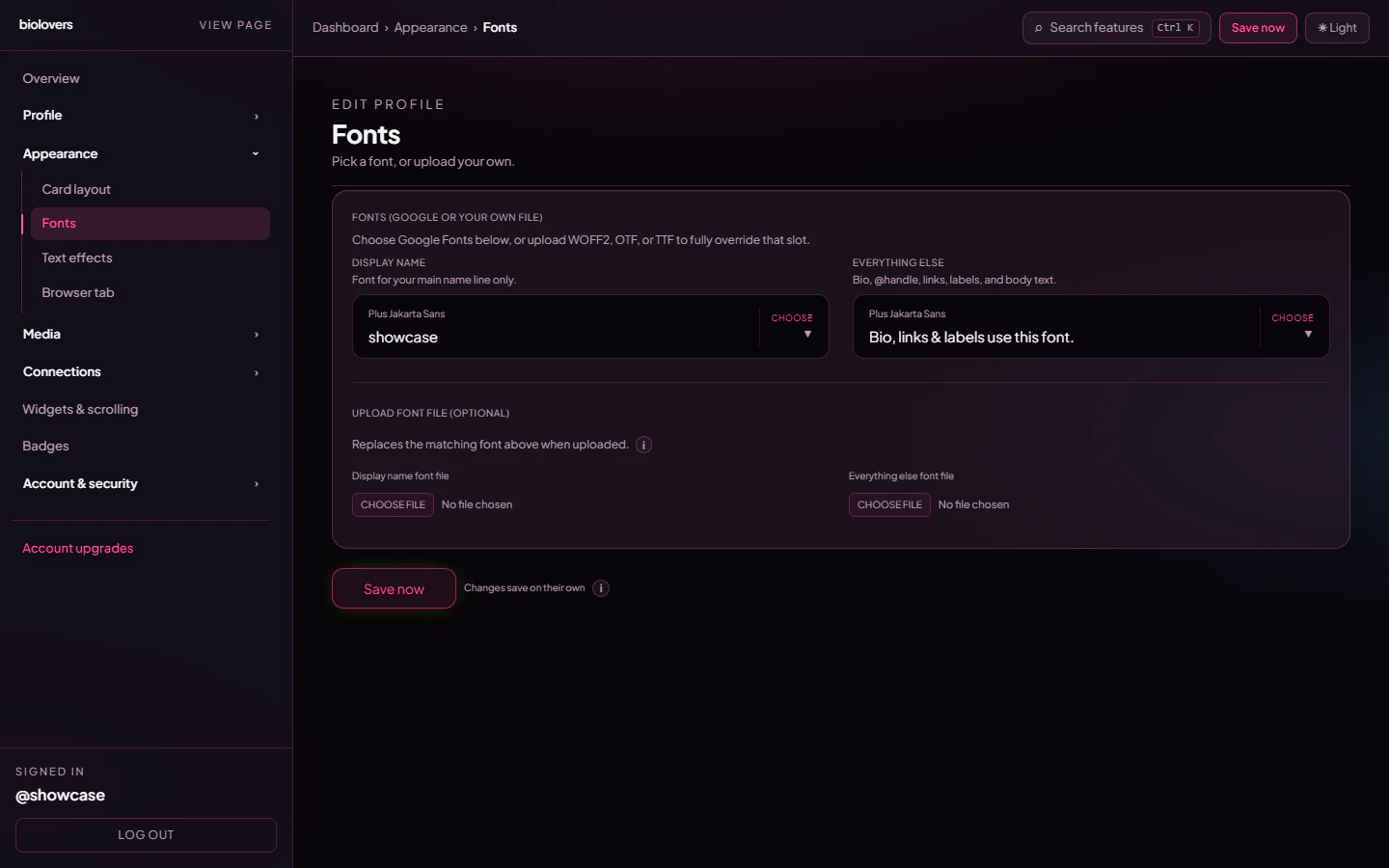
> Pick a Google Font for your display name and everything else, or upload your own font file. Premium feature.
Page on the dashboard: dashboard.biolovers.site/dashboard/edit/look/fonts
The entire **Fonts** panel is **Premium-only** — including the Google Fonts pickers. Free accounts see the panel disabled with the upsell line at the top.
Two font slots:
* **Display name** — font for your main name line only.
* **Everything else** — bio, @handle, links, labels, body text.
 ## Pick a Google Font
Each slot has a searchable picker — type to filter, click to apply. The preview line right below shows your display name (or `Bio, links & labels use this font.` for the body slot) in the chosen font.
Common picks:
* **Inter / Plus Jakarta Sans** — clean, modern UI feel.
* **Space Grotesk / DM Sans** — geometric, slightly designy.
* **Playfair Display / Cormorant** — serif, editorial.
* **JetBrains Mono / Geist Mono** — monospace, dev/aesthetic.
## Upload a font file
The bottom half of the panel — **Upload font file (optional)** — lets you replace the matching Google Font with your own file.
| Setting | Value |
| ------------ | -------------------------------------------------------- |
| Formats | **WOFF2** (recommended), **OTF**, **TTF** |
| Max size | **2 MB** per file |
| Upload slots | "Display name font file" and "Everything else font file" |
When you upload a file it overrides whatever Google Font you picked above. To revert, tap **Remove uploaded display name font** / **Remove uploaded everything else font** under the upload slot.
We don't claim any rights to your file and we don't redistribute it — it's served only on your profile page. Use fonts you have a license for.
## Per-widget custom font
The **Markdown infobox widget** has its own font upload that overrides only that widget. See [Markdown infobox](/widgets/markdown-infobox).
## Common questions
You're on the free tier. The Fonts panel — Google picks **and** uploads — is Premium-only. See [What Premium unlocks](/premium/what-premium-unlocks).
Double-check the file is one of WOFF2 / OTF / TTF and under 2 MB. Hit refresh on your public page after uploading — the browser may have cached the old font.
Uploaded fonts go to our private storage and are served from your profile page only. Catalog fonts come straight from Google Fonts.
## Pick a Google Font
Each slot has a searchable picker — type to filter, click to apply. The preview line right below shows your display name (or `Bio, links & labels use this font.` for the body slot) in the chosen font.
Common picks:
* **Inter / Plus Jakarta Sans** — clean, modern UI feel.
* **Space Grotesk / DM Sans** — geometric, slightly designy.
* **Playfair Display / Cormorant** — serif, editorial.
* **JetBrains Mono / Geist Mono** — monospace, dev/aesthetic.
## Upload a font file
The bottom half of the panel — **Upload font file (optional)** — lets you replace the matching Google Font with your own file.
| Setting | Value |
| ------------ | -------------------------------------------------------- |
| Formats | **WOFF2** (recommended), **OTF**, **TTF** |
| Max size | **2 MB** per file |
| Upload slots | "Display name font file" and "Everything else font file" |
When you upload a file it overrides whatever Google Font you picked above. To revert, tap **Remove uploaded display name font** / **Remove uploaded everything else font** under the upload slot.
We don't claim any rights to your file and we don't redistribute it — it's served only on your profile page. Use fonts you have a license for.
## Per-widget custom font
The **Markdown infobox widget** has its own font upload that overrides only that widget. See [Markdown infobox](/widgets/markdown-infobox).
## Common questions
You're on the free tier. The Fonts panel — Google picks **and** uploads — is Premium-only. See [What Premium unlocks](/premium/what-premium-unlocks).
Double-check the file is one of WOFF2 / OTF / TTF and under 2 MB. Hit refresh on your public page after uploading — the browser may have cached the old font.
Uploaded fonts go to our private storage and are served from your profile page only. Catalog fonts come straight from Google Fonts.